

When you apply for a job or a gig, you want to know if your application has actually been seen. Because that kind of information helps you a lot: You'll know whether to follow up, how and when.
Up until now, you'd send a link to your portfolio or work samples, and that was it. You had no way of knowing what happened on the other end. Did they open it? Did they look at your work?
That's exactly what Smart Share Links are designed to help you with.
What Smart Share Links do
If you want to share your portfolio, a collection, or a work sample with a specific person, you can now create a custom Smart Share Link for exactly that purpose.
A Smart Share Link is a trackable version of your normal share link. You create it, name it (for example "nytimes-application"), and send it to the recipient. From that moment on, you'll know:
- Was the link opened?
- Where was it opened from?
- Which work samples on your portfolio or collection were clicked by the person you sent it to?
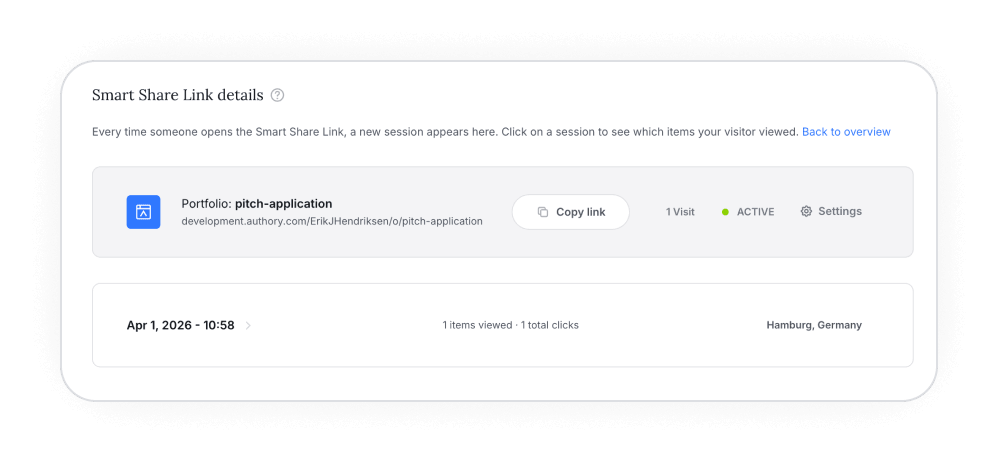
That last point is the really actionable part. If a hiring editor or a client clicked through your investigative pieces but skipped your opinion columns, that tells you what caught their attention. That's information you can use in your follow-up.
One custom link per person
You can create as many Smart Share Links as you want for the same portfolio, collection, or content item. They all lead to the same content, but each one tracks visits separately.
That means: If you send your portfolio to three different editors or clients, create three separate Smart Share Links. That way you'll know exactly which ones opened it and which ones didn't.
How is this different from your regular share link?
Your normal portfolio link is for general sharing. It's what you put in your email signature, your social media bio, your website. Anyone can visit it, and no per-visit tracking is involved.
Smart Share Links are for a different situation entirely: When you're sending your work to a specific person and you want to know if they looked at it. Job applications, client pitches, editor submissions. Whenever "did they even open it?" is a question that matters to you.
What the visitor sees
Nothing different. A Smart Share Link looks and behaves exactly like a normal link to the person who opens it. They see your portfolio or content item the same way they would through any other link.
Get started
Smart Share Links are available now. You'll find the option in the Share menu of any portfolio, collection, or content item.
For a detailed walkthrough of how to create and manage Smart Share Links, check out our help article.
