A portfolio website lets people in creative fields display their work online, whether they’re pursuing new clients, growing an audience, or applying for a job.
Portfolio builders now include drag-and-drop editors, AI design tools, and templates built for specific industries, so setting one up doesn’t require coding skills or a large budget.
This guide covers what makes a portfolio website effective and compares top platforms for 2026 across free and paid options. Plus, how to choose a builder for your goals, with examples from several creative fields.
What is a portfolio website?
A portfolio website, also called an online portfolio or digital portfolio, is a personal website that displays the best examples of your work. Unlike a résumé, which lists credentials, a portfolio website demonstrates skills and experience through real-world examples.
Key elements of a portfolio website:
- Project samples. Examples of completed work relevant to your field.
- Case studies. An explanation of the process and outcome behind a project.
- Testimonials. Feedback from past clients or employers.
- Contact information. A way for visitors to reach you directly.
Why you need a portfolio website
A portfolio website displays your previous projects in a way a static résumé can’t. It’s useful for creatives, including designers, writers, and photographers, since potential clients or employers need to see your work to judge whether your style, skills, and experience fit what they’re looking for.
Many photographers and many writers and authors are self-employed, according to the US Bureau of Labor Statistics, which means a creative portfolio often functions as their primary tool for finding work.
The projects and case studies you include in your digital portfolio gives visitors a sense of your creative process, the range and scope of your work, and what working with you would look like.
Your choice of portfolio website builder affects where that work gets seen. Dribbble and Behance, for example, both run job boards that surface creative portfolios to potential clients, so choosing a platform with those features means the portfolio itself can generate visibility beyond the link you send out.
3 types of portfolio websites
A portfolio doesn’t have to be a full website. A PDF portfolio or slide deck works for quick job applications, since you can attach it directly to an email or application form.
A website updates the moment you edit it, so anyone with the link sees your latest work instead of an outdated file. Search engines can also index a website’s pages, giving potential clients a way to find your work without a direct link from you.
There are three core categories of portfolio websites:
1. Online portfolio builders
An online portfolio builder compiles and presents your creative work in a compact, structured format. These platforms may include fully navigable multipage websites, like a freelance writer’s personal site with published articles organized by category, or scrollable one-pagers that a graphic designer sends as a supplement to a job application.
Portfolio builders offer customizable templates, drag-and-drop editors, and the ability to add a custom domain. Many include built-in SEO tools, analytics, and integrations with other platforms, giving creators more control over how their work is organized and discovered.
2. Hosted portfolio solutions
With a hosted website builder, your portfolio appears on a large platform alongside portfolios from other creators. Examples include Dribbble and Behance, both of which function as creative communities and job boards.
A custom domain name isn’t always available with hosted solutions. In exchange, these platforms provide hosting, built-in search tools, and social features like follows, likes, and comments, which support networking and visibility within a creative community.
3. Social media platforms
Some creators use social media platforms like Instagram and TikTok as their primary portfolio channels. Social media accounts are free to set up, and other users can share or comment on posts, extending a post’s reach to their networks.
Social media platforms also support formats beyond static images, including behind-the-scenes videos, work-in-progress updates, and day-in-the-life clips. Creators have more ways to present their process alongside finished work.
Best portfolio website examples
A great portfolio tells a story about your professional journey. It should be organized and easy to navigate, with enough information for any prospective employer or client, without overloading the viewer with too much content.
Examples by industry
Here’s a look at some real-world examples of creatives using professional portfolio websites to display their work and attract opportunities.
Victoria’s graphic design portfolio
Discipline: product design
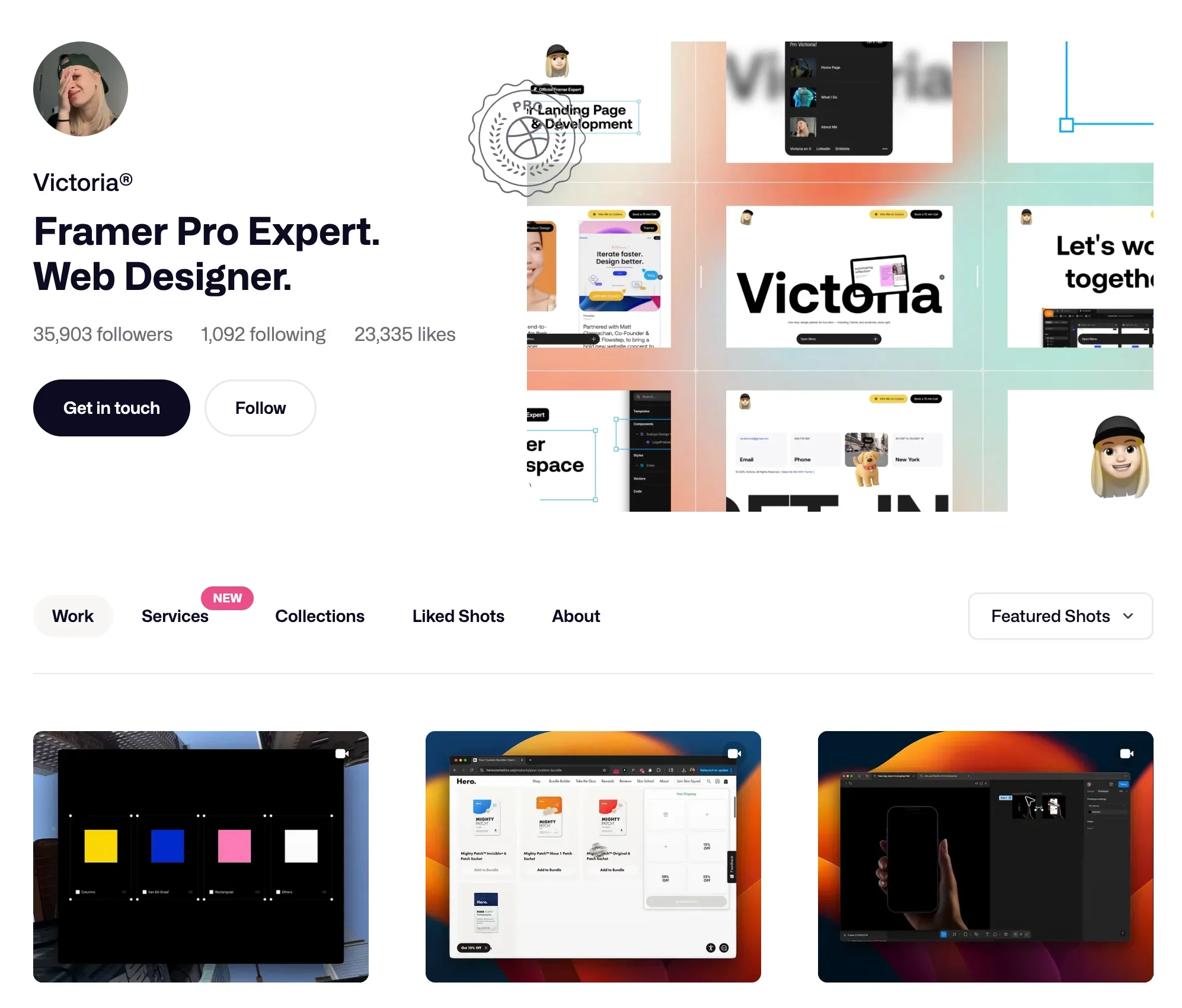
Victoria is a product designer who uses Dribbble to host her portfolio. Above the fold (the portion of a web page visible before a user scrolls), visitors see her introduction, a photo, and her positioning as a Framer Expert.
Her Dribbble profile has more than 35,000 followers, and her work is organized in a grid format that groups projects by type.
Why it works: The grid lets visitors scan dozens of projects at a glance, and the follower count and Framer Expert badge give visitors context on her experience before they read further.
Ivy’s writing portfolio
Discipline: writing and journalism
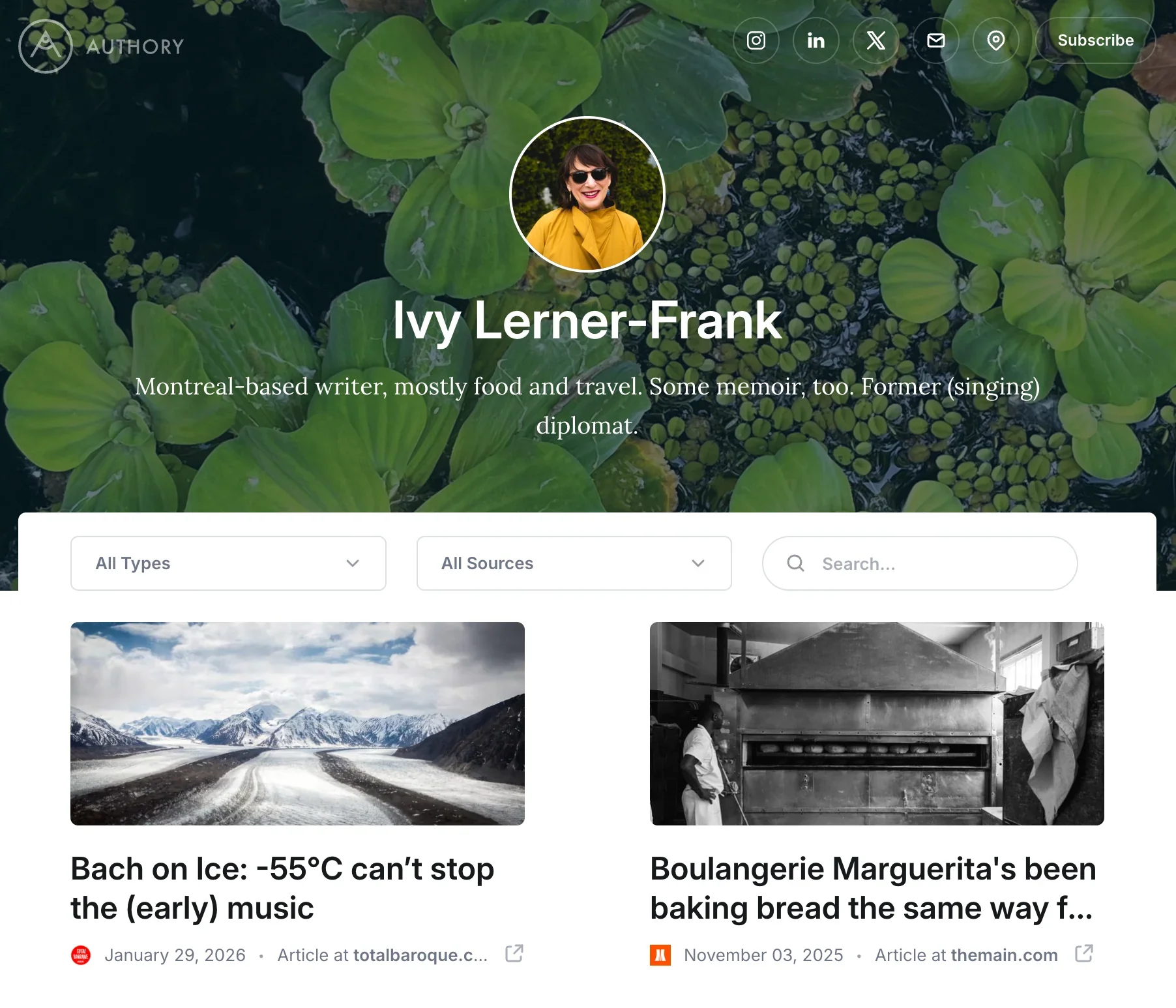
Food journalist Ivy Lerner-Frank uses Authory’s portfolio builder to share her writing samples. She includes a brief bio alongside links to her social media profiles for visitors who want to follow her latest work or get in touch.
Authory lets visitors filter Ivy’s work by content type or publication, and includes a built-in search feature, so a visitor looking for her coverage of a specific restaurant or cuisine can search for it directly.
Why it works: The filtering and search functions turn a long list of articles into something a visitor can navigate by topic instead of scrolling through everything she’s published.
Felix’s photography portfolio
Photographer Felix Ezema uses Behance’s portfolio website builder to display his visual work. Behance shows potential clients his availability, location, and the types of photography assignments he accepts.
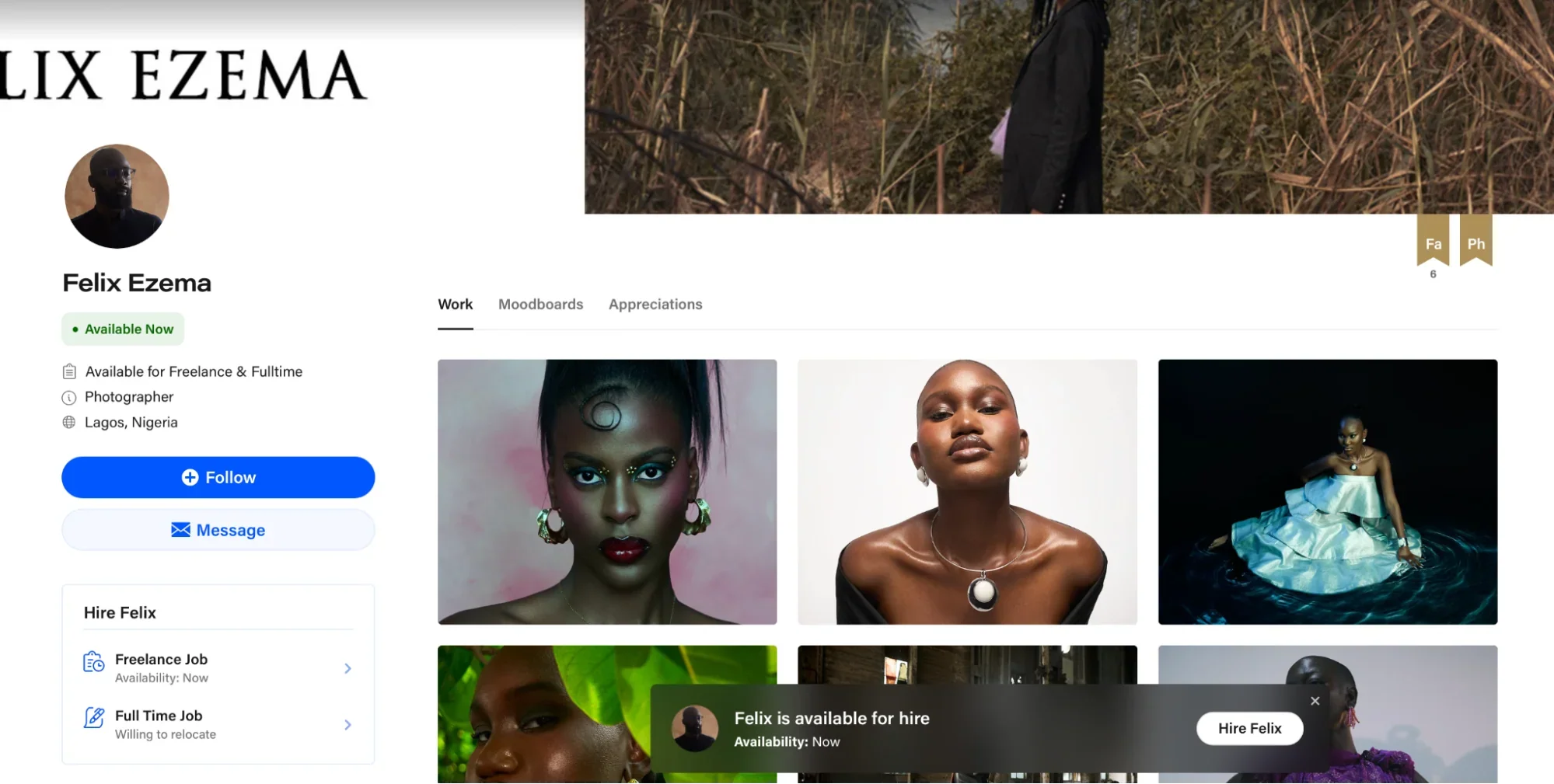
Behance also displays Felix’s engagement metrics, including views, appreciations, and followers, alongside his images.
Why it works: The layout keeps his photography as the visual focus while surfacing the practical details a potential client needs to reach out.
Examples by goal
Different portfolio websites serve different goals. Here are real examples of how creatives use portfolio websites to achieve specific objectives:
Landing a full-time job: Brittany Chiang
Software developer Brittany Chiang built a single-page portfolio with smooth scrolling and interactive elements that demonstrate her front-end engineering work directly in the layout.
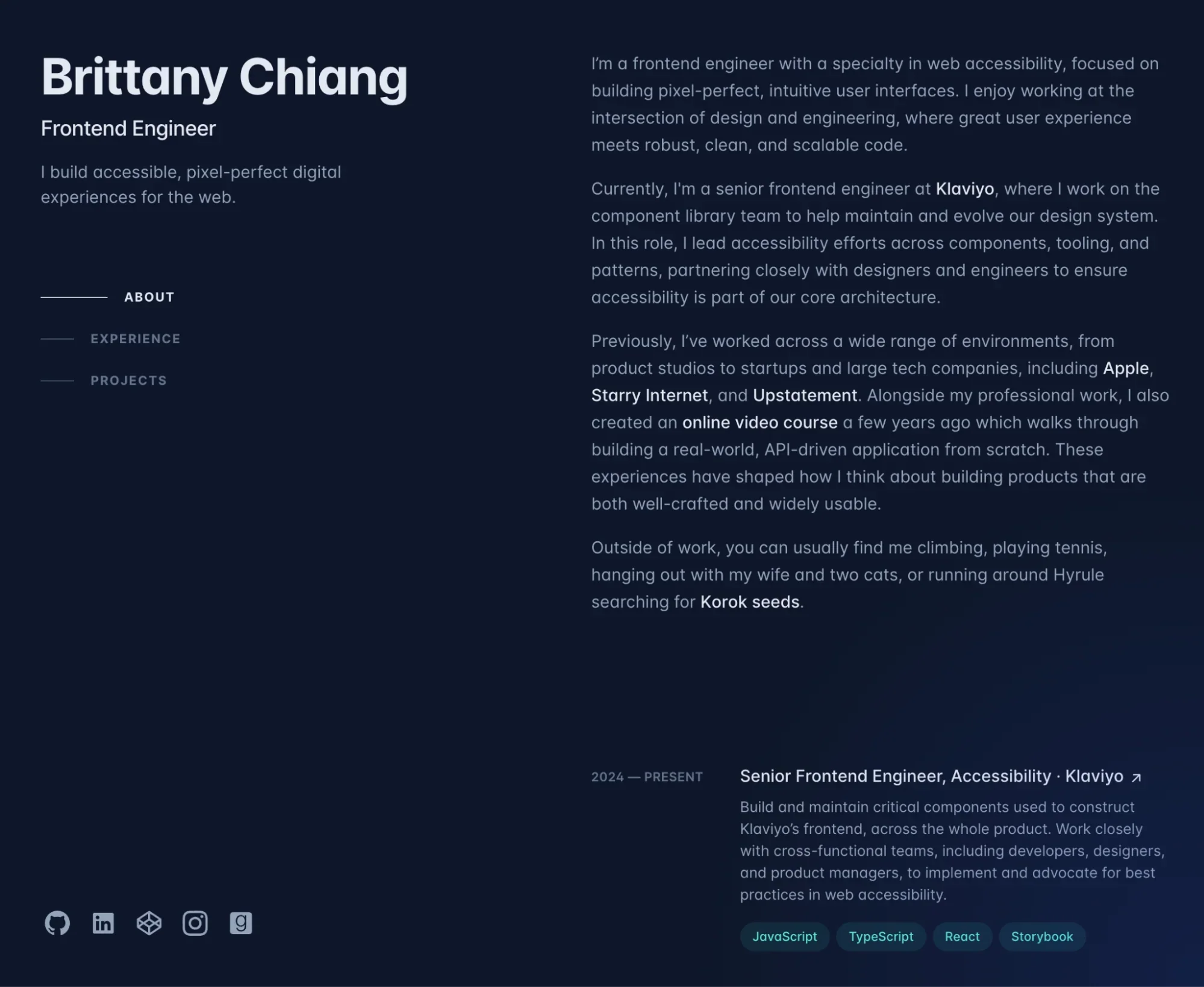
What makes it effective for job hunting: Brittany includes detailed context for each project, explaining the problem solved, the technologies used, and her specific role.
Her work at companies including Apple and Klaviyo is featured with links to projects and press coverage.
The portfolio is mobile-responsive and easy to share, which matters since hiring managers may review applications on their phones.
Attracting freelance clients: Shailendra Rana Photography
Dubai-based photographer Shailendra Rana’s portfolio displays work across fashion, ecommerce, lifestyle, and commercial photography for brands including Centerpoint, Splash Fashions, and Zee Media.
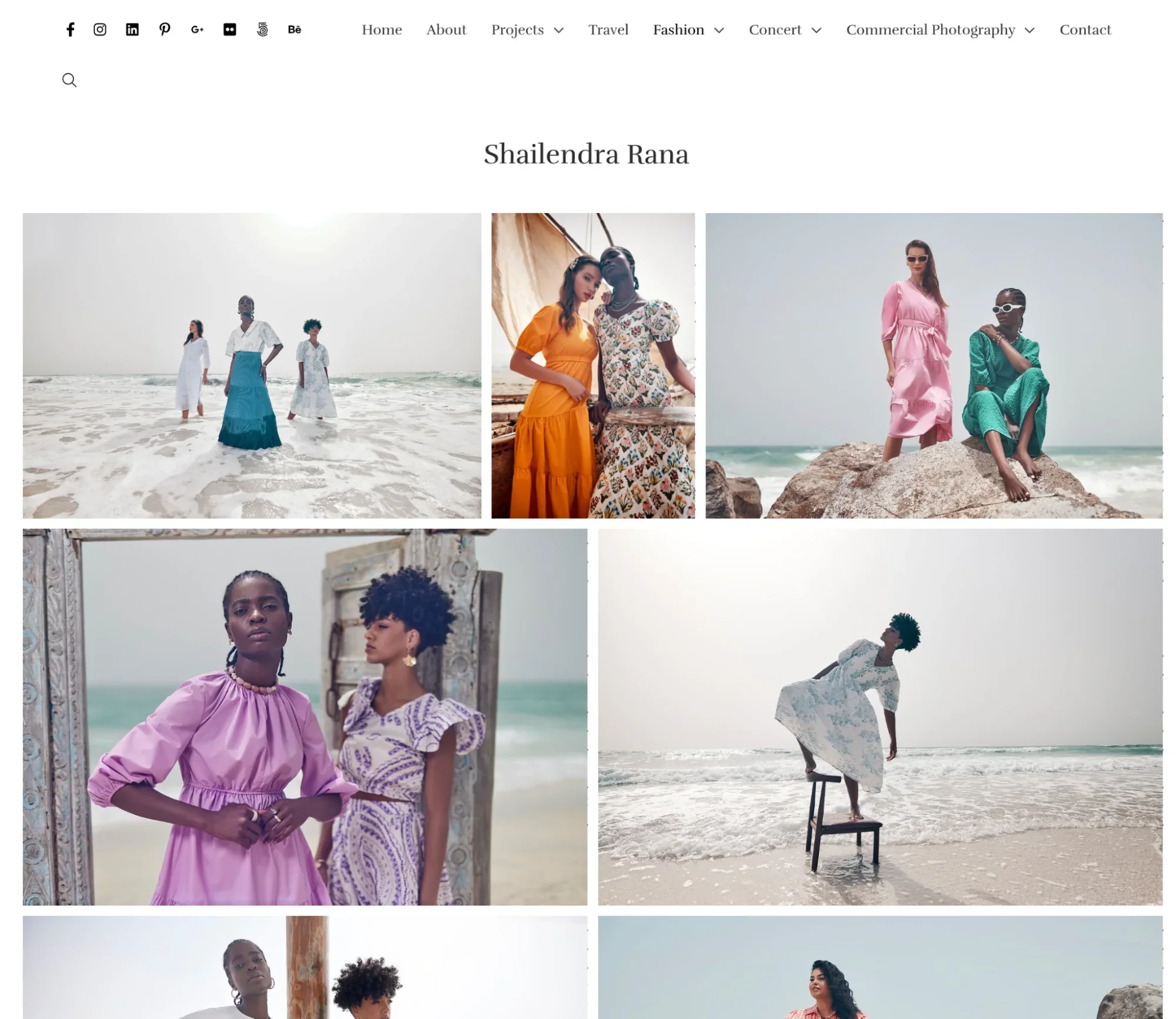
What makes it effective for freelancers: Navigation is organized by categories, including travel, fashion, concerts, and commercial photography. Grouping projects this way lets a visitor go directly to the category relevant to their project.
Shailendra’s contact information is easy to find on the site.
Building an audience: Wes Kao
Executive coach and entrepreneur Wes Kao uses her portfolio website as a content hub alongside her ongoing work. She’s cofounder of e-learning platform Maven and writes a newsletter on executive communication with tens of thousands of subscribers, according to her Substack About page.
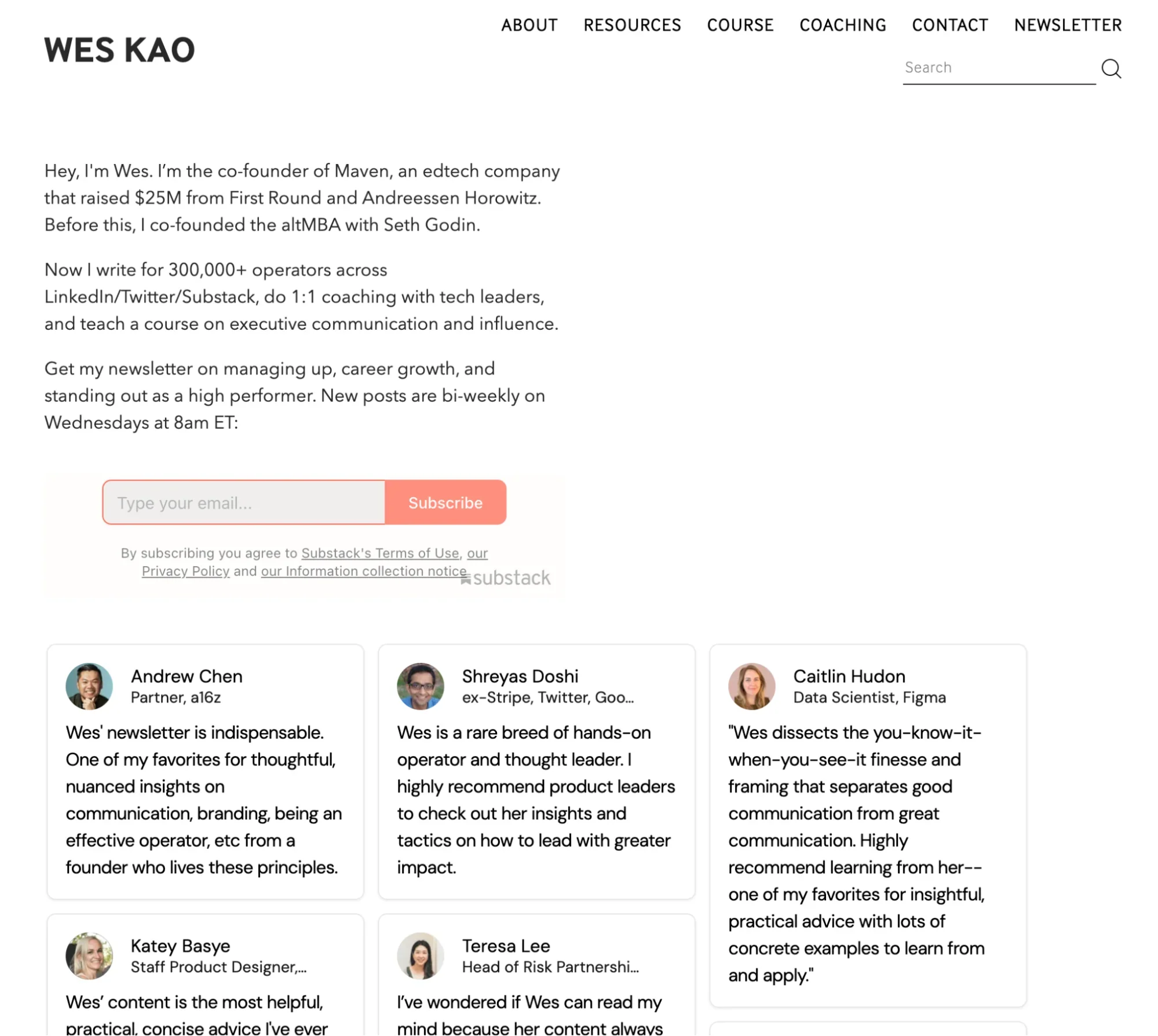
What makes it effective for audience building: The site features podcast episodes, newsletter archives, blog posts, and online courses, all in one place. New visitors can explore her work while also subscribing to her newsletter.
Social proof, including audience testimonials, media features, and client work, is woven throughout the site alongside her published content.
Establishing expertise: Jacob McMillen
Freelance copywriter Jacob McMillen’s portfolio includes an About page, service descriptions, client reviews, blog content, and a copywriting course he created, in addition to portfolio samples.
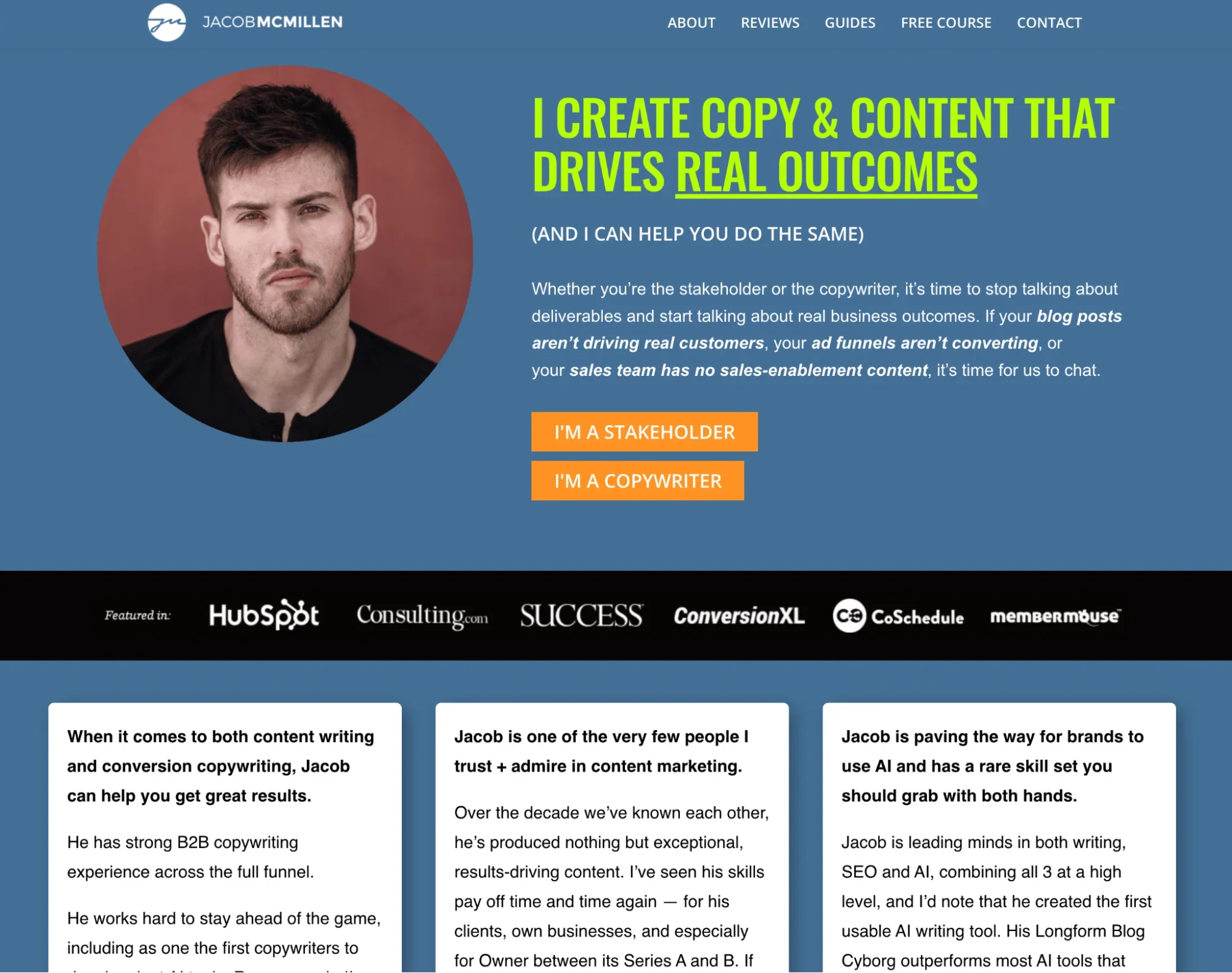
What makes it effective for thought leadership: The course gives visitors a way to learn from his approach directly, rather than only viewing finished work. Dedicated contact information and detailed service descriptions sit alongside the portfolio samples, so a visitor can move from browsing his work to reaching out.
Blog content adds another way for visitors to find his site through search, alongside the portfolio and course pages.
Quick portfolio builder comparison
| Portfolio website builder | What it’s for | Standout features | AI features | Client management | Monetization options | Cost* |
|---|---|---|---|---|---|---|
| Shopify | Photographers selling work | Built-in ecommerce, unlimited bandwidth, portfolio gallery apps, custom domains | AI website builder, product descriptions, image generation, blog content | Native order tracking, invoicing, customer accounts, client galleries via apps | Built-in ecommerce features | From $5/month (Starter); $29/month for Basic |
| Building a community | Huge user base and an opportunity to build an audience | Basic filters, auto-generated captions | Direct messaging | Via creator tools | Free | |
| Behance | Landing creative gigs | Job board, availability display, ability to build a following | Limited (through Adobe ecosystem and features on Behance Pro users) | Project collaboration and delivery, proposals, payments | Freelance marketplace | Free plan available; Behance Pro from $9.99/month |
| Adobe Portfolio | Quick Creative Cloud sites | Responsive design, Behance integration, custom domain support | No | No | No | $9.99/month for five portfolios and Behance |
| Journo Portfolio | Showcasing written work | Automatic article backups, native analytics, password protection options | No | Contact forms, portfolio invites | Built-in ecommerce features | Free plan available; paid plans from $5/month |
| WordPress | Full website control | Plug-in ecosystem, custom domain, unlimited customization and pages | Via plug-ins | Via plug-ins | Via plug-ins like WooCommerce | Free plan available; paid plans from $4/month |
| Authory | Automatic backups of written work | Automatic updates, search and filtering tools, social media analytics | No | No | No | From $9/month |
| Canva | No-code and AI design | Stock media, huge template library, AI content generator | AI-powered design, photo editing, resizing, and animation | No | Print on demand, design sales through creator program | Free plan available; Canva Pro from $15/month |
| Webflow | Custom site building | No-code builder, 2,000+ typefaces, app library | AI page generator | CMS features and memberships | Built-in ecommerce features | Free plan available; paid plans from $15/month |
| Dribbble | Design gigs | Social profile, service and package lists, strong design community | No | Messaging proposals, project milestones, file delivery, payments | Freelance marketplace | Free plan available; Pro Lite from $4/month |
| Framer | Polished marketing sites | Advanced animations, AI layout generation, freedom in design canvas | AI page/layout generation | No | Via plug-ins like Framer Commerce | Free plan available; Basic from $10/month |
| Carbonmade | Fast portfolio setup | Block-based designer, unlimited uploads, 4K video support | No | No | Basic ecommerce features | From $8.25/month |
| Fabrik | Prebuilt portfolio design templates | Blog functionality, gallery sections, custom domains | No | No | No | From $10.42/month |
| Dunked | Minimalist portfolio display | Drag-and-drop editor, content importer, HTML/CSS editing | No | No | No | From $8/month |
| Pixpa | Branded client galleries | Client galleries, visual builder, 200+ responsive templates | No | Client proofing | Built-in ecommerce features | From $5.40/month |
| Format | Sharing large files | Client file delivery, cloud media storage, workflow tools | No | Client galleries, workflow dashboard | Built-in ecommerce features | From $10/month |
*All listed pricing is billed annually
Top 16 portfolio websites for 2026
The following list includes 16 portfolio builders for 2026, organized by creative discipline. Each platform is suited to specific types of work and career goals:
- Best portfolio websites for photographers
- Best portfolio websites for writers
- Best portfolio builders for designers and illustrators
- Best portfolio websites for multidisciplinary creatives
Best portfolio websites for photographers
Photographers need platforms that handle high-resolution images while offering tools to organize and present visual work. These four options are built with photographers’ needs in mind.
1. Shopify
Who it’s for: Photographers and creatives who want to sell prints, products, or services directly from their portfolio.
Shopify is a platform for photographers and visual artists who want to display their work and monetize it. With Shopify, you can build a portfolio website that functions as both a gallery and a storefront, allowing visitors to purchase prints, book sessions, or buy merchandise featuring your work.
Photographer Peter Lik uses Shopify to combine portfolio galleries with ecommerce features. His site displays limited edition prints alongside open editions, merchandise, and luxury real estate.
Visitors can view Peter Lik’s work and purchase prints from the same site.
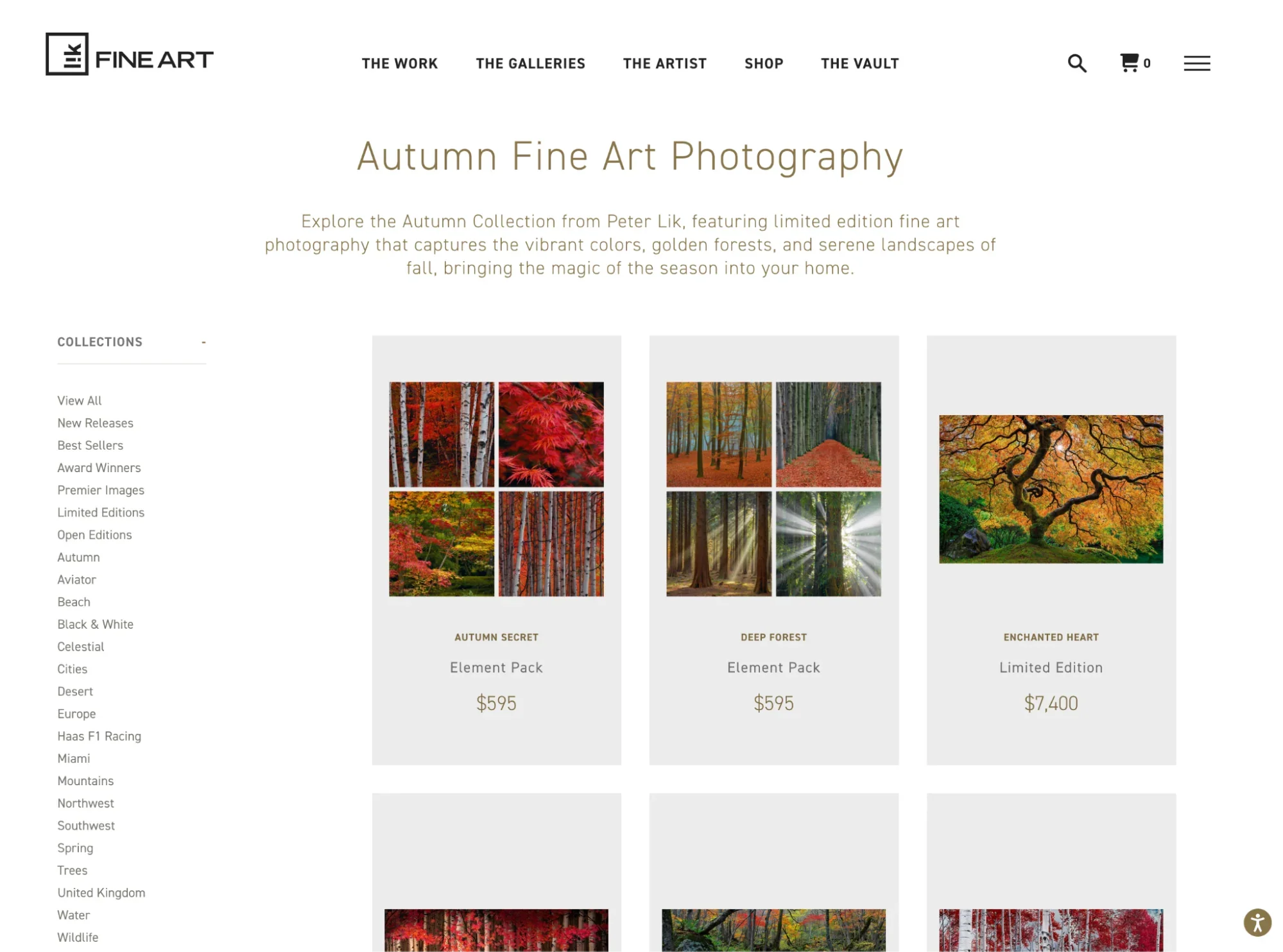
Shopify’s app ecosystem includes portfolio-specific tools like Elfsight Portfolio Gallery, which lets you create portfolio layouts with categories, pop-ups, and project details.
For photographers selling digital files directly, such as presets or downloadable prints, the Digital Products app adds files or links to products and sends customers access links after purchase. You can organize your work into collections, add filtering options, and display high-resolution images, while maintaining control over your brand’s look and feel.
Key features:
- Built-in ecommerce with secure checkout and payment processing
- Portfolio apps available for gallery-style layouts
- Digital file and download sales through the Digital Products app
- Custom domain names and templates
- Unlimited bandwidth and image hosting
- Print-on-demand integrations for selling your work
- Client booking and scheduling through apps
- Built-in SEO tools and analytics
Pricing: Plans start at $29 per month with full ecommerce features. Portfolio gallery apps like Elfsight start at $5.99 per month.
2. Instagram
Who it’s for: Creators seeking community engagement and networking opportunities.
Instagram is also a platform for sharing a portfolio to a wide audience and building a following around your work. Features like collaborative posts, tags, and Stories connect you with brands and fellow creators.
Key features:
- Exposure to three billion monthly active Instagram users
- Community of creatives across all disciplines
- Hashtags that surface your work to new audiences
- Option to rearrange your grid and customize your portfolio page
Pricing: Free for both personal and business accounts.
3. Behance
Who it’s for: Creatives looking to book new clients and find inspiration from fellow creators.
Behance is a cross between Instagram and LinkedIn. Like Instagram, Behance displays creative work in a scrollable grid format, and like LinkedIn, the platform connects creators with potential collaborators and employers. You can follow users you admire to stay up to date on their work and build your network.
Clients can filter Behance creatives based on expertise, location, and services offered, then reach out with freelance and full-time opportunities directly through the platform.
Key features:
- Job board to find new opportunities
- Custom website with hosting included
- Display your availability and hourly rates
- Search tools for client discovery
- Integration with Adobe Creative Cloud apps
Pricing: Free for a basic account; $9.99 per month for a Behance Pro account.
4. Adobe Portfolio
Who it’s for: Creators who use Adobe’s video and photo editing software.
Like other portfolio builders, Adobe Portfolio has customizable templates and lets you use a custom domain name.
Key features:
- Part of the Adobe Creative Cloud ecosystem
- Responsive design across devices
- Behance integration for expanded reach
- Custom domain name support
- Password protection options for work-in-progress
Pricing: Publish up to five portfolio sites for $9.99 per month and get Behance Pro benefits; access the full Creative Cloud Pro suite (Photoshop, Illustrator, InDesign, Premiere Pro, Acrobat, and more), plus Adobe Portfolio for $69.99 per month.
Best portfolio websites for writers
Writers need portfolio platforms that can present text-heavy work while maintaining a clean layout. These three options are built for showcasing written content.
5. Journo Portfolio
Who it’s for: Copywriters, designers, visual artists, and journalists.
Journo Portfolio lets you share both visual work and writing. You pick a template, upload your materials, then customize your layout with header images, fonts, and colors.
Key features:
- Import PDFs, images, videos, and audio files from a URL
- Automatic screenshot backups of your online articles
- Password restriction options for work-in-progress or sensitive projects
- Newsletter feature to send weekly updates to subscribers
- Built-in analytics to track portfolio performance
Pricing: Free for a site with up to 10 items and a journoportfolio.com domain name. The Plus plan allows up to 50 items and starts at $5 per month.
6. WordPress
Who it’s for: Writers and creators seeking extensive customization.
WordPress is a content management system (CMS) that powers more than 40% of websites worldwide, according to WordPress.
WordPress is flexible and customizable, and it includes a dozen free portfolio templates to get started. A library of more than 60,000 plug-ins lets you customize your tech stack and add features as your needs evolve.
Key features:
- Unlimited pages and uploads
- Library of more than 60,000 WordPress plug-ins
- SEO tools and social sharing options
- Built-in website analytics
- Integrated blogging platform with content management tools
- Custom domains available
Pricing: Free for unlimited pages and uploads with a wordpress.com domain name. The Personal plan, which adds a custom domain, is $4 per month.
7. Authory
Who it’s for: Writers who want a “set it and forget it” portfolio builder.
Authory is a portfolio builder designed specifically for writers, authors, and journalists. Instead of manually adding each piece of work, Authory scans the web to find content with your byline and pulls it into your portfolio automatically, keeping the site up to date without manual uploads.
Key features:
- Self-updating portfolio that finds your published work automatically
- Detailed social media analytics
- Automated backup of removed articles (protecting against link rot)
- Customizable collections to organize your portfolio by topic or publication
- Automatic email updates to subscribers when you publish new work
Pricing: Plans start at $9 per month when billed annually.
Best portfolio builders for designers and illustrators
Designers and illustrators need portfolio platforms that offer creative control and display visual work clearly. These four options provide the flexibility designers need.
8. Canva
Who it’s for: Creatives looking for simple, one-page portfolio sites.
The Canva portfolio builder has templates for one-page portfolio websites, simple sites with continuous scroll. This works well when navigation would distract from your work’s visual impact.
Canva’s editor resembles a slide deck editor. The platform has more than 260 million users and lets you customize multiple sections simultaneously, giving you an overview of your entire project.
Key features:
- Free website template library with hundreds of designs
- Drag-and-drop visual editor
- Access to more than 141 million premium images, videos, graphics, GIFs, and audio with Canva Pro
- AI content generator (Magic Write) for copy
- Custom domain support
Pricing: Free plan, more advanced features comes with Canva Pro, currently priced at $15 per month.
9. Webflow
Who it’s for: Designers with a specific vision for their portfolio.
Webflow is an option for full website capabilities and customization without coding. The platform gives designers control over individual elements while maintaining a visual, no-code interface.
You’ll choose between starting with a blank slate, using a template, or following guided video tutorials. With custom font upload and design options as granular as opacity, blur, and custom animations, you can fine-tune details on your site.
Key features:
- No-code website builder with designer-level control
- Extensive customization options (CSS Grid, Flexbox, custom animations)
- Built-in website hosting and analytics
- Advanced SEO tools
- App library for extending functionality
Pricing: Free for a webflow.io domain with two pages. Paid plans start at $15 per month for a custom domain and benefits like higher site bandwidth.
10. Dribbble
Who it’s for: Graphic designers searching for a new job.
Dribbble lets designers present their work to potential clients and fellow creators. It’s a place to share your portfolio and find inspiration for future projects by exploring what other designers are creating.
The site functions as both a portfolio platform and a job board, with search features that help potential employers discover your work. More than 40,000 companies, including Apple, Airbnb, and Slack, use Dribbble to find design talent.
Key features:
- Built-in job board with design-specific opportunities
- Social media-style profile that other users can “follow”
- Add services and packages to your portfolio page
- Community of designers for networking and feedback
- AI website builder to design your portfolio based on a prompt
Pricing: Free for a basic account; $4 per month for a Dribbble Lite account with additional features and increased visibility.
11. Framer
Who it’s for: Advanced design customization.
Framer is a website builder created by designers, for designers. You can use it to create a portfolio that displays your work and reaches potential clients through Framer’s Experts library, which connects designers with businesses seeking their services.
Key features:
- Interface with animations
- AI wireframing tool to speed up initial portfolio design
- Advanced website analytics to track visitor behavior
- Marketplace to sell your Framer designs and templates
- Expert directory to discover potential clients
Pricing: Free plan provides 500 credits to try, basic plan starts at $10 per month for a custom domain.
Best portfolio websites for multidisciplinary creatives
Multidisciplinary creatives need flexible platforms that can display diverse work types, from photography to writing to design, in one cohesive portfolio. These five options are built for versatility.
12. Carbonmade
Who it’s for: Creators looking for easy-to-edit templates for visual work.
Carbonmade has hosted more than 2 million portfolios for professionals who display visual work, like photographers, user interface (UI) designers, and creative directors.
After inputting your profession, you’ll see a list of relevant templates that you can customize once you’ve uploaded your projects.
The templates include features designed specifically for visual work, such as slideshows, image cropping, and caption placement.
Key features:
- Block-based website designer for customization
- Unlimited layouts, galleries, and uploads
- Talent Pool to find freelance opportunities
- HD video storage and hosting
- Social media integration
- Project analytics to track portfolio performance
Pricing: $8.25 per month for a beginner portfolio with up to eight projects.
13. Fabrik
Who it’s for: Creators who want to avoid spending time on site layout.
Fabrik is a portfolio website builder for filmmakers, photographers, artists, and designers who want to skip manual site design.
You start by selecting your portfolio template and uploading your projects. From there, instead of manually adding your content to each section, Fabrik arranges your materials into the template for you. You can customize your layout if needed.
Key features:
- Unlimited blog posts for content marketing
- Gallery and blog sections integrated together
- Tutorial library to help you make the most of the platform
- Custom domain name support
- Free trial available to test the platform
Pricing: $10.42 per month for 10 portfolios and 50 projects.
14. Dunked
Who it’s for: Visual creatives looking for a fast way to build a portfolio website
Dunked is a website builder with 18 portfolio template options. Drag-and-drop functionality lets you rearrange your uploaded images, and you can customize your site with a logo and tagline, fonts and colors, and custom CSS code for advanced users.
You can also add Contact, FAQ, and About pages, so portfolio visitors can inquire about your services or learn more about your background and process.
Key features:
- Import content from YouTube, Vimeo, and Flickr
- Visual editor with drag-and-drop functionality
- Responsive website design
- Template library
- Free trial available
Pricing: From $8 per month for 100 projects.
15. Pixpa
Who it’s for: Creatives looking for a portfolio built with templates.
Pixpa prompts you to choose a template designed for the type of work you’re displaying (like UI design, photography, or animation) and lets you browse example portfolios for inspiration before committing to a direction.
After choosing colors and fonts, you enter an editor where you can add text, embed features, and upload images. Even when adding additional page sections, you’ll be able to choose from existing templates.
Key features:
- Visual website builder with no coding required
- More than 200 responsive website templates
- Branded client galleries
- 30-day money-back guarantee
- 24/7 customer support
Pricing: From $5.40 per month for 10 pages, 200 images, and a free domain for a year.
16. Format
Who it’s for: Creatives looking to create search-optimized websites where they can book clients.
Format is used by more than 50,000 creative professionals in 190 countries and has features designed for working creatives who need to manage client relationships.
After you input your industry and profession, Format suggests templates tailored to your type of work, whether that’s photography, art, design, fashion, or content creation.
Format has both basic and advanced features: you can generate downloadable links for clients, use built-in SEO tools to increase your visibility in search results, and set up client galleries with proofing tools.
Key features:
- Video hosting with generous storage limits
- Cloud image storage for large portfolios
- Branded and personalized client galleries with proofing
- Prebuilt website themes and templates
- Website building service for hands-off setup
- Google Analytics integration
Pricing: From $10 per month for 10 website pages and 70 image uploads.
How to choose the best portfolio website for your needs
Choosing the right portfolio platform means matching a platform’s features to your goals and budget. Use this framework to narrow down your choices and select the platform that serves your needs.
Determine your needs and budget
Before you settle on a portfolio website, consider your portfolio’s purpose, the type of work you’re displaying, and your budget constraints. Starting with the basics and figuring out what’s most important will help narrow your search.
Use these questions to guide you:
Is your portfolio primarily for job hunting?
Job hunting portfolios typically include case studies, project explanations, and shareable links. Platforms like Adobe Portfolio, Behance, and Carbonmade have layouts built around that structure.
Are you looking to attract freelance clients?
Client acquisition involves displaying a range of work and including elements like testimonials and availability. Choose platforms that allow client testimonials, display your availability, and make contact information prominent. Dribbble, Behance, and Format have features like service listings and client galleries.
Do you need to build an audience and establish thought leadership?
Audience building involves content creation and distribution alongside portfolio work. WordPress, Webflow, and platforms with integrated blogging features let you publish content, grow an email list, and share expertise beyond your project work.
Are you transitioning careers or industries?
Career changers often use platforms that allow detailed storytelling and project context. WordPress and Webflow have the flexibility to create custom layouts that combine previous experience and new-direction content, with space for personal projects and detailed case studies.
What’s your realistic budget?
Free options include Instagram, Behance, and WordPress. A budget of $10 to $20 per month adds custom domains, advanced analytics, and client management features to a portfolio. Factor the website’s cost into your long-term financial planning. Most paid portfolio website builders charge monthly or annually, and these recurring costs add up over time.
Free vs. paid portfolio websites
Free and paid portfolio options come with different trade-offs depending on your current needs and future growth.
Free portfolio websites
Free options work for students, early-career creatives, or anyone testing a platform before committing to a paid plan. They provide enough functionality to display your work without financial commitment.
Paid portfolio websites
Paid platforms add features for creatives who are actively marketing their services, applying for competitive positions, or building a professional brand.
Here’s how free and paid portfolio websites compare:
| Free portfolio websites | Paid portfolio websites | |
|---|---|---|
| Pros | Zero financial risk, which allows for experimentation | Custom domain names (yourname.com) |
| Quick setup with minimal time investment | Full creative control and customization options | |
| Features for basic portfolio needs | Generous or unlimited storage for high-resolution work | |
| Often include community features and networking opportunities | Advanced analytics to understand visitor behavior | |
| Migration path to paid plans as your needs grow | Client management and proofing tools | |
| No platform branding or ads | ||
| Priority customer support | ||
| Cons | Comes with platform branding (e.g., “yourname.wordpress.com”) | Monthly or annual costs (around $8 to $30 per month) |
| Limited customization options | Steeper learning curve for advanced features | |
| Storage restrictions on images and video | May require separate domain registration | |
| Fewer analytics and SEO tools | Annual commitments for best pricing | |
| No client management features | ||
| Potential ads on your site |
Research and compare different options
Once you’ve assessed your needs and budget, explore available platforms. Some options are better suited to specific fields and goals, so researching before committing saves time later.
Match platforms to your discipline
Certain portfolio builders are built for specific creative fields. Authory and Journo Portfolio are built for writers, while Dribbble and Behance are built for visual designers. Platforms like Format and Pixpa include client gallery features for photographers. If you work in a specialized field, prioritize platforms built for your type of creative work.
Consider discovery and networking features
If you want clients to find you organically, prioritize platforms with search indexing and job boards. Dribbble and Behance include job boards that connect creatives with potential clients. If you already have clients and need a portfolio site rather than a discovery platform, a standalone portfolio builder like WordPress may fit better.
Evaluate template quality
Browse example portfolios on each platform before committing. Check whether the templates reflect current design trends and whether they display work similar to yours. Templates built for your type of work reduce design time during setup.
Test the editor
Most platforms have free accounts or trials. Spend 30 minutes using the portfolio editor to upload work and customize a page. Check how the editor handles your file types, how much control it gives you over layout, and how the editing process feels, not just the finished product.
Consider the user experience and design
Multiple platforms have similar features for similar prices, so your choice may come down to user experience (UX) and user interface (UI) design. Everyone’s workflow is different, and interface preferences vary from person to person. Some elements to consider include:
- Editor interface. Some creatives prefer drag-and-drop simplicity (Canva, Dunked); others prefer more precise control (Webflow, Framer).
- Portfolio browsing experience. Put yourself in a visitor’s shoes. Check whether it’s straightforward to navigate between projects and whether visitors can find what you do and how to contact you without extra clicks.
- Mobile responsiveness. More than half of web traffic comes from mobile devices, according to StatCounter. Check that your portfolio functions on phones and tablets, not just desktop computers.
- Loading speed. High-resolution images are part of a creative portfolio, but slow-loading pages affect how long visitors stay on a page. Choose platforms that optimize images automatically and have fast hosting.
- Free trials. Many paid portfolio sites have trials that let you start with a free site before deciding whether to upgrade. Take advantage of these options to test the platform with your actual work before committing to a paid plan.
What to include in your portfolio
Curating the right content matters as much as choosing the right platform. When creating your portfolio, choose the pieces that most highlight your abilities, along with any descriptions or biographical information that provides deeper context into what you offer.
Your best work only
Include 10 to 15 of your strongest projects rather than everything you’ve ever created. Each piece can represent your best skills and the type of work you want to do more of. If a project doesn’t make you proud, leave it out.
Project context and storytelling
Explain the process alongside the final result. For each project, include:
- The brief or challenge you were solving
- Your role and responsibilities
- Your creative process or approach
- The final outcome and impact
- Any measurable results or client feedback
Bio and about sections
Help visitors understand who you are beyond your work. Include:
- Your creative background and experience
- What drives your creative practice
- The types of projects you’re seeking
- Your process and what you’re like to work with
- Current availability and contact information
Clear contact information
Include multiple contact options (email, phone, LinkedIn, contact form) and respond when people reach out. Consider adding a services page that outlines what you offer and how to work with you.
Testimonials and social proof
If you have them, include brief client testimonials, awards, publications, or notable collaborators. Positive reviews bolster your reputation and can indicate trustworthiness and reliability.
Regular updates
Update your portfolio with new projects, remove older work that no longer represents your current skill level, and keep your bio current. Set a reminder to review and refresh your portfolio every three to six months.
How to create a portfolio website (step by step)
- Choose a platform. Match a platform to primary goal, discipline, and budget. A photographer selling prints needs different features than a writer submitting freelance pitches.
- Pick and customize a template. Select a template built for the type of work being displayed. Adjust colors, fonts, and layout to match a personal or professional brand, then remove any placeholder content before adding real work.
- Curate the work. Select 10 to 15 of the strongest projects rather than a full archive. For each project, add context: the brief, the role played, the process, and the outcome.
- Write the bio and about section. Cover background, current focus, and the types of projects being sought. Add current availability and contact information.
- Set up navigation and structure. Organize projects into clear categories or collections. Keep the path from homepage to individual projects to contact information short and direct.
- Add contact information and a services page. Include at least one direct contact method, such as email or a contact form. A services page outlining rates, process, or availability helps visitors understand how to start a project.
- Optimize for search and mobile. Add descriptive titles and alt text to images. Compress large image and video files to reduce load time. Preview the site on a phone and tablet, not just a desktop screen.
- Test and publish. Click through every page and link before making the site public. Fix broken links, typos, and formatting issues, then publish.
Before publishing, run through this checklist:
- Confirm the site displays and functions correctly on mobile screens
- Register and connect a custom domain
- Do a final quality assurance (QA) pass and compare the finished site against portfolios in the same field for design gaps
Create your portfolio and stand out
Building a portfolio doesn’t require technical expertise or a large budget. Platform, presentation, and purpose are the main choices to make. A writer might use Authory to automatically pull in published work, a photographer might use Format’s client galleries to manage projects, and a multidisciplinary creative might use WordPress for added flexibility.
A portfolio changes as skills and work change. Refreshing work samples, updating a bio, and testing new ways to present a creative process keeps a portfolio aligned with your career development.