
TL;DR
Choose an EHR by mapping your patient journey, confirming certification, and making vendors demo your hardest workflow — 63% of providers want one login and unified tools, and most adoption problems surface in weeks 2 to 6 after go-live, so plan for that stretch before you sign. Tebra’s cloud-based, certified EHR connects charting, billing, and scheduling for private practices.
EHR systems in healthcare are now standard, and their usage has increased from 42% in 2008 to 95% in 2024.
Many practice owners even call it a practice’s “central nervous system,” and for good reason.
Every time a patient visits your practice, the EHR stores all the information about the visit and any follow-up plans. By the time they’re done and reach their car, the claim for the visit can be generated and on its way to the payer — that is, if the EHR works well.
In this guide, we’ll explain what an EHR is, how it differs from other healthcare systems, and what to look for when you’re buying one for your practice.
What is an electronic health record (EHR)?
An electronic health record (EHR) is a real-time, digital version of a patient’s chart. It securely stores demographics, diagnoses, medications, allergies, test results and clinical notes, and it gives you and other authorized providers instant access to a patient’s full medical history.
The difference between an EHR and a paper-based chart is that the former is built for secure sharing. Paper-based records are prone to damage, data loss or unauthorized sharing.
With an EHR, you can avoid these issues by securing everything digitally and putting the right controls in place to prevent data loss or leaks.
As of 2024, 99% of hospitals and 91% of office-based providers use a certified EHR. And this change has been accelerated through the introduction of regulations like the HITECH Act (2009) and Health IT modules in the Health IT certification program (2010). That said, solo practice providers are still playing catch up, likely because it’s too expensive or complex to implement.
| An electronic health record is a digital system that securely stores and organizes a patient's essential health information, providing a comprehensive view of their overall health. |
What information is included in an EHR chart?
A typical EHR chart includes the clinical details a provider needs to make decisions, plus any administrative details that apply. For example:
- Identity and coverage: Name, date of birth, contact details, emergency contacts and insurance information
- Medical history: Past diagnoses, surgeries, immunizations, family history and habits like smoking or alcohol use
- Medications and allergies: Current and past prescriptions, dosages and recorded reactions
- Results and vitals: Lab work, imaging and pathology reports, and readings like blood pressure, heart rate and weight over time
- Encounters and care plans: Progress notes, diagnoses, referrals, orders and treatment plans from each provider involved
- Patient-reported and social data: Symptom or quality-of-life questionnaires, social determinants of health (SDOH) and genomic data in some specialties
Note: With Tebra’s cloud-based EHR, you see this view on one screen, with lab orders and billing details for each visit close at hand.
The differences between EHR vs EMR vs PHR
Even though these acronyms sound like they refer to the same system, they don’t. The difference comes from who manages the record and how far it can travel after it leaves your examination room. Here’s what that means:
- Electronic medical record (EMR): A digital chart that stays within a single practice, used mostly for that practice’s documentation and billing.
- Electronic health record (EHR): A record designed to travel with the patient and be shared securely with other providers and labs involved in their care.
- Personal health record (PHR): A PHR is a record that the patient owns and manages. It’s usually built from information the patient downloads from their providers or adds themselves.
| EMR | EHR | PHR | |
| Who manages it | One practice | Providers across organizations | The patient |
| What it covers | Visits at that practice | Full history across providers | Whatever the patient adds or imports |
| Shared with other providers | Rarely | Yes, securely | When the patient chooses |
| Typical example | A standalone charting system in one clinic | A certified EHR connected to labs, pharmacies, and health information exchanges | A health app or a file of downloaded records |
| Federal certification | Varies | ONC certification available | Not certified |
The best-case scenario is using an EHR because it keeps a complete record of your patient, and that “file” updates every time they visit you or another provider.
Pro tip: Many vendors use EMR and EHR interchangeably, so ask whether they can share the record securely. If you’d still like to understand the differences, check out our guide on EMRs vs. EHRs.
What are the core capabilities of EHR systems in healthcare?
Every EHR should have two sets of capabilities: clinical and administrative. Here’s a list of features each of them should include:
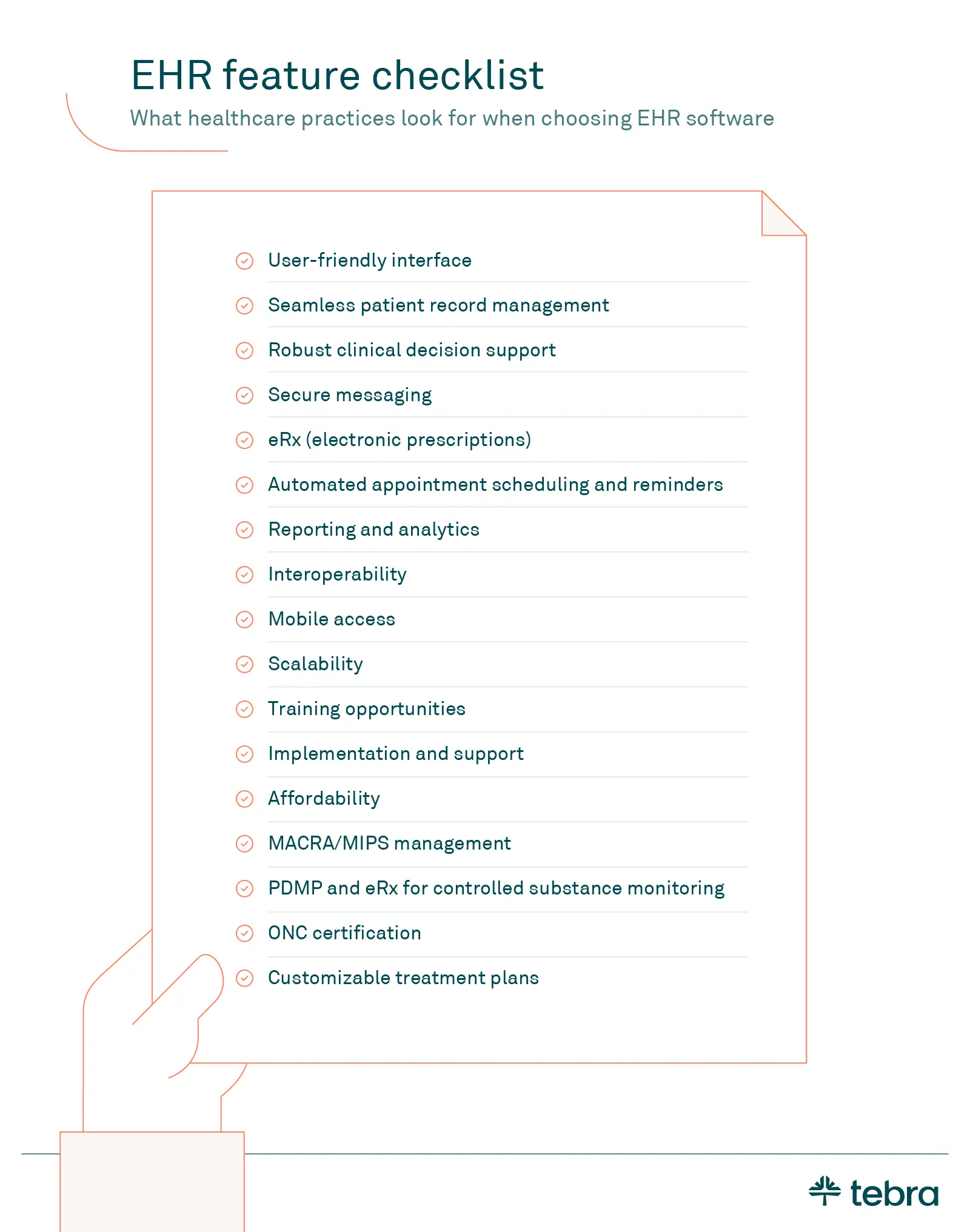
Clinical tools
You and your clinical staff use these tools while you treat patients and document their care:
Charting templates and AI notes
Charting tools are how you document each visit. In Tebra’s 2026 after-hours charting report, providers spent an average of 4.8 hours a week charting outside scheduled hours. It’s time-consuming, so look for specialty-specific templates and an AI tool that drafts notes from your conversations.
ePrescribing (eRx)
ePrescribing lets you send a prescription directly from the patient’s chart to their pharmacy. Because it starts in the chart, your EHR can check it against the patient’s medication and allergy list before sending it out.
Tip: For controlled substances, you’ll need electronic prescribing of controlled substances (EPCS) and a built-in check against your state’s prescription drug monitoring program (PDMP).
eLabs
eLabs connect your EHR to the labs you work with. When you order a test from the chart, the results come back right there. Seventy percent of healthcare professionals say their team has to correct missing or delayed results, and 74% say this affects a diagnosis or treatment decision. To avoid this, check if the EHR has an eLabs module to send and receive this data.
Clinical decision support
Clinical decision support (CDS) includes the alerts and reminders your EHR shows you during a visit. The suggestions are usually based on the patient’s chart and evidence-based guidelines. For example, a CDS can flag a drug-allergy conflict as you prescribe medication.
Patient portal and secure messaging
The patient portal is a secure website or app where patients can view visit summaries and test results and message your team. It replaces phone calls with text-based messaging. As of 2026, 56% of providers already follow up with patients through a portal — so it’s now a necessity as more patients expect fluid communication.
Telehealth
An EHR with a built-in HIPAA-compliant telehealth module lets you run video visits from the same schedule and chart you use for in-person appointments.
Administrative tools
These tools help you run the business side of each patient visit:
Digital intake
Digital intake lets patients complete their forms online before the visit, and their answers flow straight into the chart. Practices spend an average of 13 hours a week on handling intake paperwork. Choose a system that automatically connects intake answers to the patient record.
Online scheduling and reminders
Online scheduling lets patients book and reschedule appointments themselves. Plus, the EHR sends automated reminders by text or email before each visit. This matters because 17% of patients say they’d switch providers if they can’t book online. And 69% say they’re more likely to show if they can reschedule online.
Billing and medical coding
If your EHR integrates billing, you can suggest the right diagnosis and treatment codes. And you can send this information into the claims submission form directly. This reduces the chance of coding errors and claim denials.
Reporting and quality programs
With the number of patient records and workflows you’ll have, it’s important to understand how the practice functions as a whole. Reporting tools help by consolidating data from revenue to quality measures.
If you participate in Medicare’s Merit-based Incentive Payment System (MIPS), your EHR data also determines whether you earn a positive or negative payment adjustment.
Role-based access controls
HIPAA’s minimum necessary standards require you to limit access to information based on a person’s role and job needs. Use role-based access to decide which staff members can access specific types of data and who can edit them.
Your EHR should also keep a record of who opens each record and when — in an audit log.
EHR based on medical specialty
In our conversations with practice owners, we also found they choose EHRs based on whether they were purpose-built for them.
So consider your specialty type too when researching an EHR.
What are the benefits of using an EHR?
The main goal of using an EHR is to stop information from getting lost between people or practices. Here’s how that effort impacts your practice:
- Better care coordination: Every member of your team can see the same up-to-date chart at the same time, and everything updates in real time.
- Fewer medication errors: In a 2026 Tebra survey, 18% of practices said intake errors had led to an adverse clinical event — like wrong medication or an allergic reaction. Most EHRs default to checking a patient’s prescription against specific allergies or current medications to reduce the risk of adverse interactions.
- Less time on documentation: Most modern EHRs offer two features that reduce documentation time: specialty-specific templates and AI-assisted note-taking.
- Cleaner billing processes: When you use an EHR with built-in claims processing, it ensures claims are created from the chart and mapped to the right billing codes.
- Easier access for patients: A Tebra survey reported that 69% of patients use AI to get a second opinion after meeting a healthcare provider.
What are the most common challenges of EHR adoption?
Every software you try to adopt and implement comes with its own set of challenges. Some are technical, while others are sociotechnical. The EHR is no different.
- Increased screen time in the exam room: Patients prefer in-person visits because they get 1:1 attention from their providers. If you’re using an EHR, you might spend too much time looking at a screen instead of them, and patients notice.
- Partial EHR adoption: An EHR isn’t a magic bullet, so some clinicians keep paper for one-off tasks an EHR may not capture. But it also means the EHR becomes an incomplete record if it isn’t updated.
- Sticking to old habits: Old habits die hard, so new users tend to recreate their old workflows in the EHR.
- The transition period takes too long: When you “go-live,” it just means that the EHR system is in place and your team gets started with it. Most people incorrectly assume that that’s the end of it.
What are the types of electronic health records software?
- By the care setting they’re built for
- By where the software is hosted
Types of EHRs by care setting
- Inpatient EHRs are built for hospitals.
- Ambulatory (outpatient) EHRs are built for clinics and private practices.
Types of EHRs by hosting model
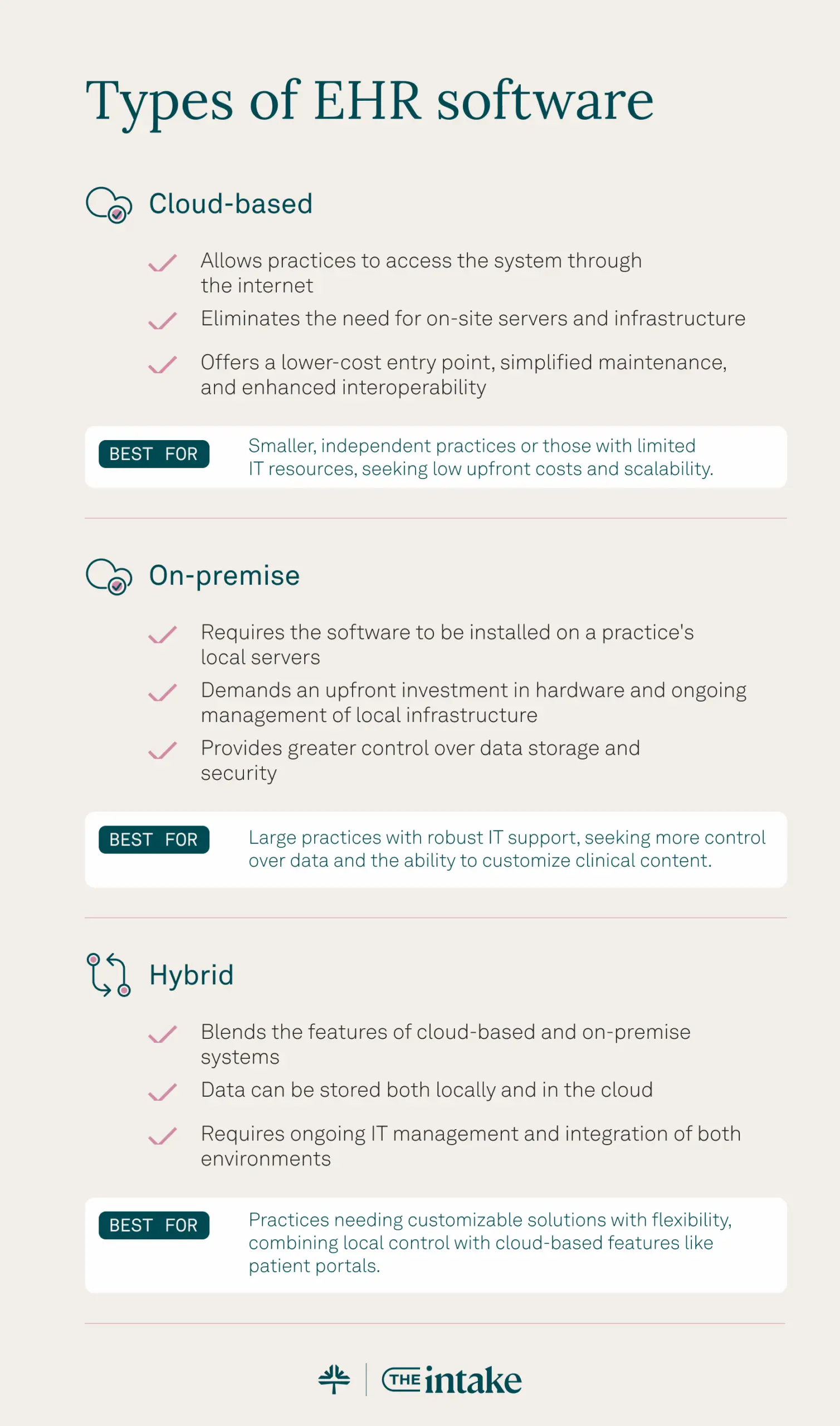
1. Cloud-based EHRs
Cloud-based EHRs, also known as software as a service (SaaS) solutions, allow practices to access the system through the internet.
2. On-premise EHR software
On-premise EHRs require you to install the software on your practice’s local servers. This model demands an upfront investment in hardware and ongoing management of local infrastructure but eliminates recurring subscription fees.
3. Hybrid EHR systems
Hybrid EHRs blend cloud-based and on-premise features. Data can be stored locally and in the cloud, balancing flexibility, control, and scalability.
| Cloud-based | On-premises | Hybrid | |
| Upfront cost | Low (subscription) | High (servers and licenses) | Medium |
| Who maintains it | The vendor | Your practice or IT contractor | Both |
| How you access it | Any device with an internet connection | Your office network, with remote access if you set it up | A mix of both |
| Who’s responsible during an outage | Your internet provider and the vendor | Your hardware, power, and backups | Both |
| Best for | Small and private practices | Large groups with in-house IT | Practices that want local control plus cloud features |
How does an EHR system work in healthcare organizations?
Typically, 5 steps happen from before a patient enters your practice to after they leave. An EHR should cover these steps, so your team doesn’t spend too much time on data entry or duplication.
- Step 1. Scheduling, intake, and check-in: Maria books her follow-up online and fills out her intake forms on her phone the night before.
- Step 2. Chart review and documentation: You check her A1C trend and allergy list before you walk in.
- Step 3. Orders, ePrescribing and labs: Let’s say Maria mentions a sinus infection and you prescribe amoxicillin.
- Step 4. Coding, billing and checkout: Your note supports the visit codes, so the claim goes out from the same system.
- Step 5. Follow-up and patient access: A few days later, her lipid results land in the portal with a short note from you.
What regulations must an EHR comply with?
Before you trust an EHR to host your patient data, check whether it’s ONC-certified. An ONC-certified EHR has passed federal testing for core functions like data exchange and patient access to records.
You also need to ensure the EHR complies with the Health Insurance Portability and Accountability Act (HIPAA).
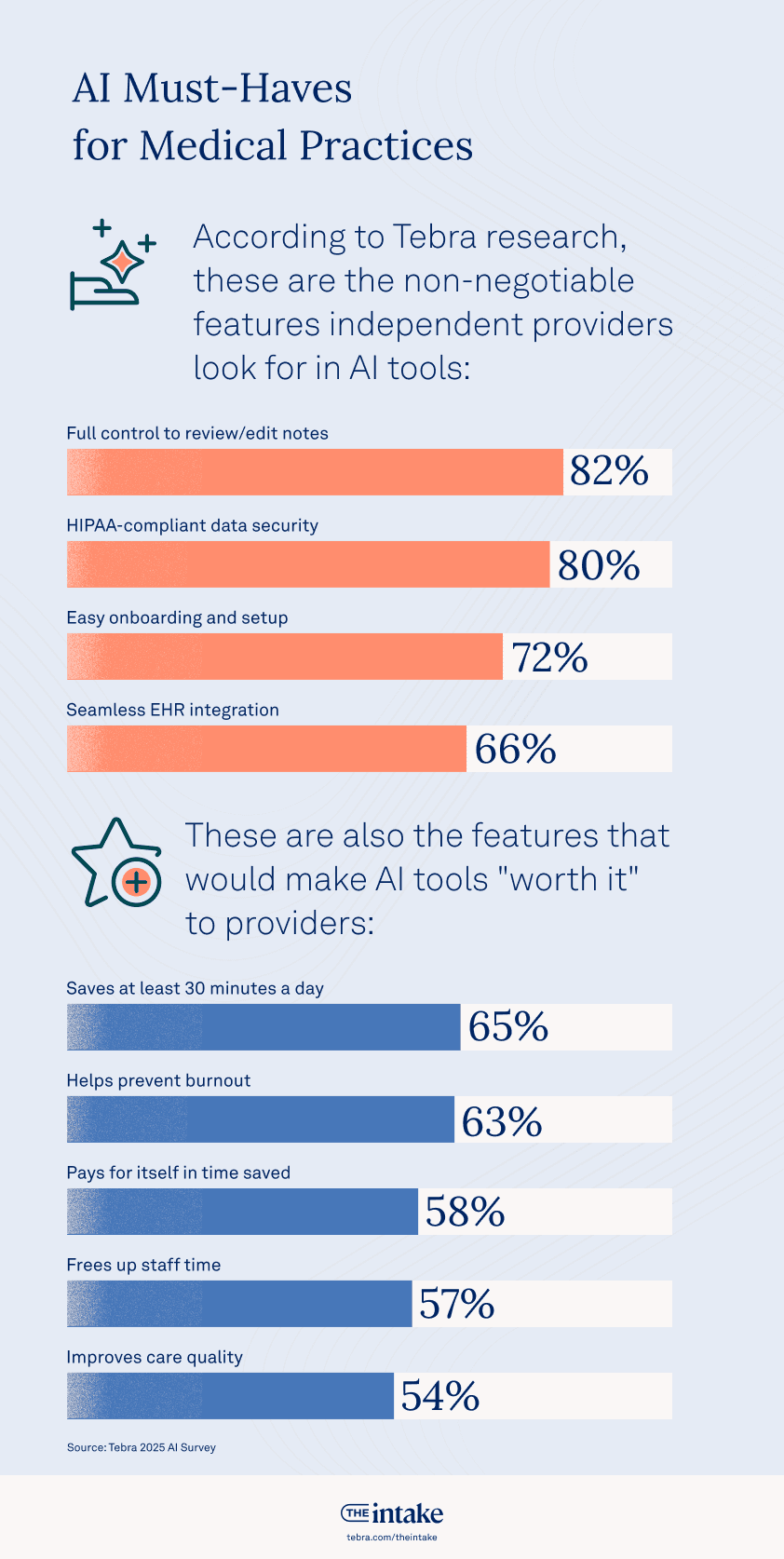
How are next-generation EHRs using AI?
If you’ve ever finished a full day of appointments and then opened your laptop to a list of unsigned notes, you’ve probably already guessed where AI made its mark first.
In EHRs, AI integration started with notes and charting. AI scribes listen to the patient visit and draft notes.
How can you choose the right EHR for a private practice?
- Map your patient journey: You need to write down each step from the first booking to the final payment, and who on your team owns it.
- Rule out vendors who don’t have the right certifications: Confirm the product appears on ONC’s Certified Health IT Product List and that the vendor will sign a business associate agreement (BAA).
- Make vendors demo your hardest workflow: Make sure the vendor shows how the EHR works with different systems in your tech stack.
- Keep your tools under one login: Ideally, your EHR should have multiple modules so that you can consolidate your tech stack as much as possible.
- Understand the total cost of ownership: The cost of an EHR is just the direct cost. You also need to consider additional factors like implementation, data migration, staff training, additional integrations, and maintenance.
- Ask about data ownership: Ask what format your data comes out in and whether the data export actually costs extra.
- Get the SLAs and uptime documented: Choose a vendor that commits to high uptime in its service level agreement (SLA) and has few or no outages on record.
- Run a pilot with your staff: Run a demo first with your front desk lead and billing staff to see whether the EHR fits your current workflows.
| When | What usually happens | What to do |
| Before go-live | Workflows and roles are still unclear | Decide who documents what, set up templates and billing codes, run a test patient from intake to billing, and write your downtime plan |
| Weeks 1 to 2 | The schedule is lighter, and the system looks fine | Keep the schedule light and name an in-house go-to person who logs the workarounds staff use |
| Weeks 2 to 6 | Full volume returns, notes go unfinished, templates don’t fit, and the first claim denials arrive | Review templates and workflows at the one-month mark, and check early denials for setup errors |
| Month 2 onward | Training fades, and old habits creep back | Block weekly admin time for the first two months and schedule a refresher after your first busy season |
A checklist to evaluate EHR vendors
- Listed on ONC’s Certified Health IT Product List
- Signs a business associate agreement
- Offers role-based access controls and audit logs
- Handles the hardest workflow in your specialty during the demo
- Connects charting, scheduling, billing, and patient messaging under one login
- Integrates with your labs, imaging centers, pharmacies, and regional health information exchange
- Includes AI documentation you can review and edit before signing
- Commits to high uptime in a written SLA, with a clean outage history
- Spells out data export terms, including format and cost, in the contract
- Lists every cost upfront, including migration and training
- Provides onboarding and support hours that match your clinic schedule
- Shares references from practices in your specialty
Choose an EHR that keeps your practice connected
Ultimately, your EHR needs to fit how your practice runs without creating unnecessary manual burden for your team. Everything about your patients should live in each record, and that can only happen with a “connected care” system that gets the job done.