Shopping for a new Windows laptop? As 2024 draws to a close, that process - which has never been simple - is further complicated by the fact that Microsoft’s operating system is in transition.
After decades of running primarily on processors that use Intel's x86 architecture, Microsoft made Windows work very well with chips that use a design licensed from Arm. In doing so, the company is going in the same direction as Apple, which has transitioned all its Macs to its Arm-based Apple Silicon platform, seeking some of the same advantages.
With two processor options available, should you choose an Intel- or Arm-based system as your next Windows portable? Whether you are buying online or in a brick-and-mortar store, you’re going to be confronted with this choice, along with having to decide on memory, storage, screen size and type, ports, pricing, etc. etc. etc. and yada yada yada. What was confusing before is even more so now!
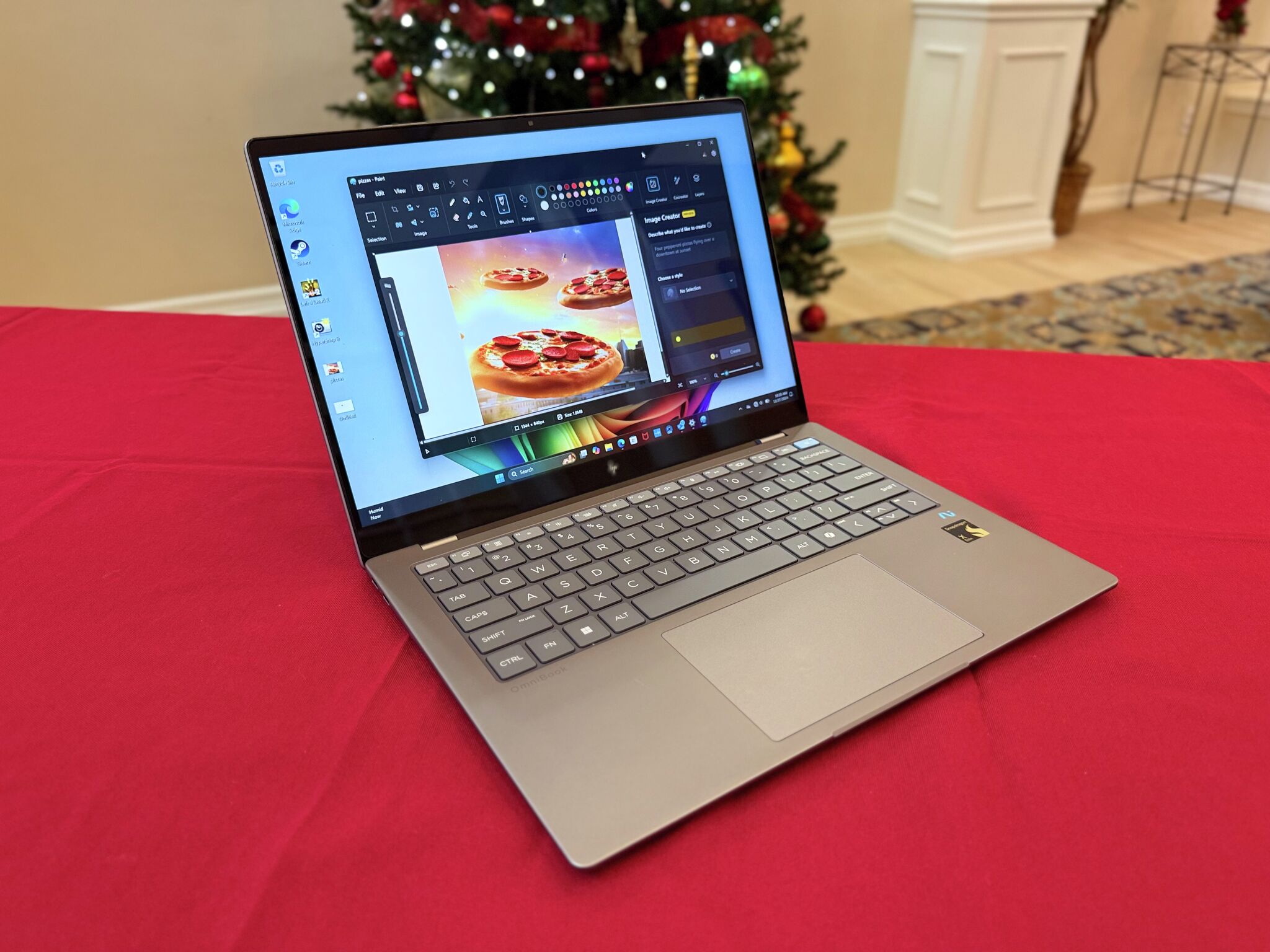
I tested a new HP OmniBook X 14 laptop to help decide. This notebook with is one of a growing number of new PCs that feature a Qualcomm Snapdragon X Elite processor, an Arm-based chip that also enables onboard artificial intelligence features. As such, it carries Microsoft’s Copilot+ PC branding. More about that in a moment.
Why might you want one of these next-generation PCs? Computers built around an Arm-based chip have better battery life and use less energy but are often faster and more powerful than comparable models that use Intel-based processors. Apple’s dumping of Intel for its own Mac chips, developed initially for iPhones and iPads, put competitive pressure on Microsoft to make Windows work better on Arm. The software giant has long offered Arm versions of Windows, but they didn’t work as well. That has changed, big time, though there may still be issues.
Microsoft has done an excellent job of making most modern Windows software run on the Arm systems, either by working with developers to produce titles written specifically for the platform, or using an emulator, which makes a program think it’s running on an Intel-based system. This is the same approach Apple took when it moved from Intel to its chips. However, there are still some obscure applications, particularly those that are custom-made for businesses or schools, that may have compatibility issues.
And if you use apps like that, your decision got easier: Choose an Intel-based computer.
For everyone else, read on.
The HP OmniBook X 14 I tested comes with 16 gigabytes of memory and 1 terabyte of storage. The display is a 14-inch touchscreen and has a resolution of 2,240-by-1,400 pixels, or 2.2K, which is better than a lot of 14-inch Windows laptops – they typically sport a 1080p, HD resolution. Its brightness level, at 300 nits, is fine in most home and office environments, but not great for outdoor use.
There’s a 5-megapixel webcam atop the screen that delivers an excellent image. It supports Windows Hello, the facial-recognition feature for unlocking a PC, and AI-based visual effects, such as making you look like a computer illustration or a watercolor painting. It also does a passable job of keeping you in the center of the frame if you move around.
The laptop is thin and light, at just under three pounds and just over a half-inch thick. The metal body feels solid, though lacks the premium feel you’d find in higher-priced, aluminum-body notebooks.
The keyboard has a comfortable feel, and the touchpad is large and responsive – maybe a little too much so. I had to turn off a feature to keep the cursor from auto-highlighting text whenever I brushed my fingers across the pad while writing this column.
One of my biggest complaints about the OmniBook is the selection of ports. The left side has two USB-C ports – one that transfers data at 40 gigabits per second, the other at 10-Gbps. The right side hosts has a headphone jack and a USB-A port half-covered by a pull-down door. I would have preferred an HDMI port to the legacy USB-A, but as it is you’ll likely want a hub or docking station to get a full complement of ports anyway.
One nice touch: Both the USB-C ports can drive a display with just a high-speed USB-C and video cable – no need for a dongle if your monitor supports USB-C video, as my 32-inch Dell UltraSharp does. Yay!
The biggest selling point for these Arm-based PCs is performance and battery longevity. I spent a few days using the OmniBook as my sole computer, doing productivity tasks, social media, watching videos, checking email and researching. At the end of an eight-hour day, the laptop was typically down to about 50% to 60%. Effectively, I could do a full two days of work without charging it. That’s exceptional.
And while it’s definitely not the speediest computer I’ve used, it’s no slouch. Apps performed flawlessly and quickly – even those that I knew weren’t Arm-native – and I couldn’t find one that wouldn’t run on the Snapdragon chip.
Now, about those AI-based features that make it a Copilot+ PC: I was underwhelmed. The keyboard features a Copilot key that, when pressed, launched a window into which you can work with Microsoft’s AI client. Much of the processing is done on the computer, rather than in the cloud, but I really couldn’t tell much difference from using the built-in AI versus using OpenAI’s ChatGPT (on which Copilot is based), Google Gemini or Anthropic’s Claude.
Several of the built-in Windows apps feature AI components, most notably Paint. Image Creator is a text-to-image generator that works fairly well. I asked it for four pepperoni pizzas flying high over downtown at sunset and it rendered the image close to the description (though with extra ingredients I didn’t order!). Cocreator in Paint lets you draw something, provide a description and it generates what it thinks you want. This required a little more fiddling with the controls to get what I wanted, but Paint eventually got there.
One feature I did not get to try: Recall, the controversial AI component that lets you search everything on your PC, from documents to video you’ve watched to teleconferencing sessions and more. It has been delayed over privacy issues, and while I was working on this review it finally became available in beta or preview versions of Windows 11 updates. I opted not to try it just yet, and will test it later once it’s closer to production.
But the HP OmniBook X 14 doesn’t really need the AI features to sell it. The model I tried goes for $1,099, but it’s currently on sale for significant, holiday season. If you’re not using highly niche software and yearn for all-day-plus battery life and respectable muscle, this is an excellent choice.