CNN Underscored Money
All small businesses need a reliable, fast and affordable payment processing system. There are plenty of sophisticated options on the market, with SumUp and Square among the leaders with their affordable transaction fees, contemporary card readers and point-of-sale (POS) systems.
We’ve spent hours researching knowledge bases, connecting to customer support lines and chatting with real-life users to provide a clear SumUp vs. Square comparison, so you can choose the right option for your business.
We receive compensation from our partners for Featured Offer placements, which impacts how and where their offer is displayed.
SumUp vs. Square snapshot
Pricing and plans
SumUp
SumUp’s pricing consists of hardware, transaction and monthly fees. Lean businesses can opt in to the POS Lite plan, which has no monthly fees. It offers basic commerce features like payment processing and inventory tracking, along with more advanced features like payout reports.
The POS with Connect Lite plan costs $99 per month and includes a cloud-based POS and customer database. In addition, SumUp offers dedicated installation and training to help bring your team up to speed on its technology.
Growing businesses may consider the POS with Connect Plus plan ($199 per month), which includes everything in Connect Lite, as well as a money-back guarantee, customer rewards, automated marketing, and weekly email and SMS promotions.
The POS with Connect Pro plan ($289 per month) is best for medium-sized businesses that need unlimited marketing and email promotions to reach a larger audience.
In addition to monthly fees, SumUp charges per-transaction fees, which vary depending on the payment method. For in-person transactions made on any of SumUp’s card readers, you’ll pay 2.6% plus 10 cents per payment. You can also accept online payments with SumUp, but the transaction fees are slightly higher: 2.9% plus 15 cents for invoice links and 3.5% plus 15 cents for QR code and e-commerce payments.
Square
Square’s pricing also consists of hardware costs, transaction fees and monthly fees.
Square offers several industry-specific plans, including for restaurants, retailers and appointment-based businesses. Restaurant plans start at $0 and can cost up to $165 per month per location. Retailer plans are offered at $0 and $89 per month per location. There’s also a custom option available that’s based on your business’s unique needs. The appointment-based plans cost from $0 to $69 monthly per location.
Square’s online transaction fees are a little lower than SumUp’s. You’ll only have to pay 2.9% plus 30 cents to accept payments through your online shop. If you want to enter a payment manually, that’ll cost 3.5% plus 15 cents per transaction. In addition, there’s an invoicing option that’ll run you 3.3% plus 30 cents per sale.
You can also opt for a buy now, pay later option with Afterpay. With this option, you’ll be paid in full immediately while your customers will have six weeks to pay the total amount interest-free. Each Afterpay sale incurs a fee of 6% plus 30 cents, both for in-person and online payments.
Verdict: Square wins with its affordable and flexible pricing options
Both Square and SumUp offer worthy plans that are ideal for small-business owners, but Square’s plans are more affordable overall. Plus, its buy now, pay later option gives your customers more payment flexibility, something SumUp doesn’t offer in any plan.
Hardware options
Both SumUp and Square offer POS devices and card readers ranging from simple to sophisticated, but is one provider’s hardware better for your business than the other’s? Here are each company’s offerings:
SumUp
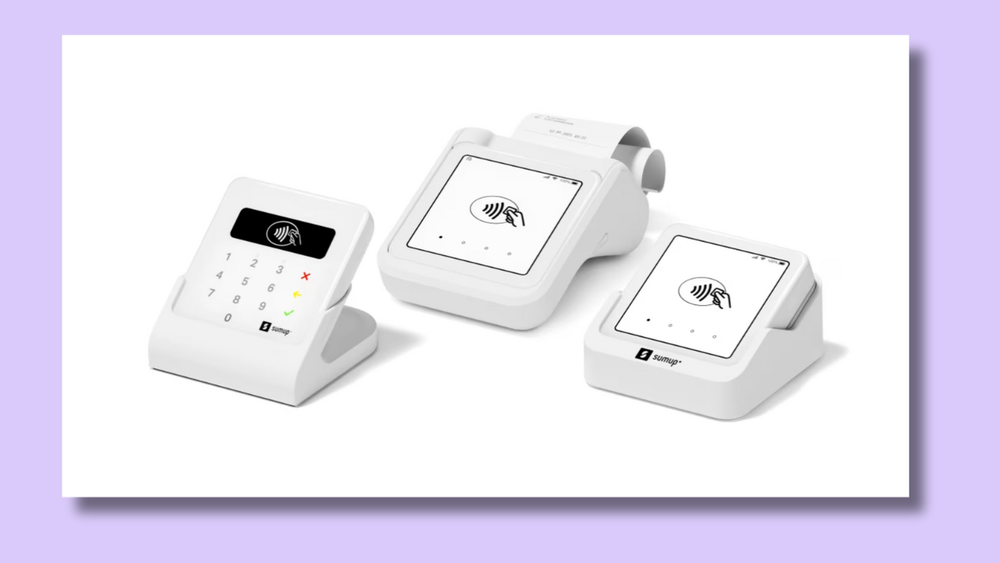
SumUp’s hardware selection is simple to understand and includes all the essentials a small business is likely to need. However, it lacks many of the accessories and bundle options that Square provides. Still, SumUp’s products are great for those seeking an affordable way to start accepting payments.
Here are the six hardware options within the SumUp product line:
- SumUp Plus card reader ($54): This device connects to your smartphone or tablet and accepts swipe, tap and chip payments. It’s USB-C rechargeable and lasts up to 500 transactions per charge.
- SumUp Plus Cradle Bundle ($64): With this bundle, you’ll receive the SumUp Plus card reader and a charging cradle for extended battery life.
- SumUp Solo ($99): This card reader comes with a visual touch screen, eliminating the need for a phone or tablet.
- SumUp Solo Printer Bundle ($169): This bundle includes the SumUp Solo card reader and a convenient receipt printer.
- POS Lite and Solo Bundle ($499): This hardware package comes with SumUp’s touchscreen POS tablet, an aluminum stand and the SumUp Solo card reader. It offers increased functionality, like controlling sales, managing item catalogs and generating reports.
- SumUp POS (contact for pricing): When you sign up for SumUp POS, you’ll receive hardware like a customer touch screen and an employee register.
Square
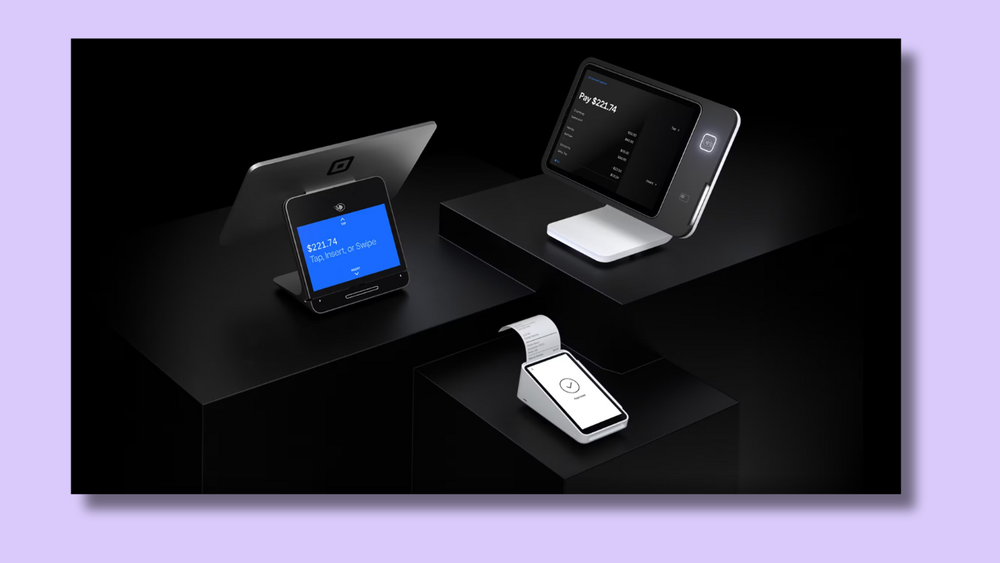
Square currently offers six POS hardware options ranging from $10 to $799.
- Square Reader for magstripe (free/$10): The most affordable of Square’s hardware, this simple swipe-only card reader connects to any smartphone or tablet. You get your first magstripe card reader for free when you sign up.
- Square Reader for contactless and chip ($59): This compact card reader accepts chip and contactless payments.
- Square Kiosk ($149): This iPad-powered device pairs with Square’s Kiosk app to create a seamless self-service checkout experience for shoppers.
- Square Stand ($149): This device connects to an iPad, which, alongside Square’s free POS app, can be converted into a complete POS system that swivels to accommodate both the seller and purchaser.
- Square Terminal ($299): This hand-held card reader accepts swipe, tap and chip payments, prints receipts, and functions independently of a smartphone or tablet.
- Square Register ($799): This versatile POS system comes with both a customer and merchant display and doesn’t require additional hardware or software, meaning you’re ready to accept payments right out of the box.
In addition to the options above, there are plenty of hardware kits with bundled items, including cash drawers, printers, barcode scanners, cases, wall mounts, displays, scales and replacement items.
Verdict: Square wins with its robust hardware offerings
While both SumUp and Square offer quality card readers and POS systems, Square has over a dozen helpful accessories for industry-specific business needs. In addition, Square is the only one to offer a self-service option, and its free magstripe reader makes it easy for anyone to swipe debit and credit cards without any upfront hardware investment.
That said, Square’s extensive product line could feel overwhelming for an entrepreneur, and there may be more decision fatigue with Square than with SumUp.
Customer support
The best credit card processing companies have a reliable and knowledgeable support team behind them in case anything goes awry.
Let’s see how SumUp and Square stack up in terms of customer support:
SumUp
SumUp provides customer support Monday through Friday from 9 a.m. to 7 p.m. ET. You can contact SumUp’s support team by phone or email. Current users also have the option to chat with the customer support team when logged in to their account. In addition, SumUp’s robust support center can help you troubleshoot hardware, software and account issues.
We’ve found that users have mixed feelings about SumUp’s support. Some consider it to be quick and helpful, while others have experienced extended wait times and unprofessional responses. In general, it seems like SumUp’s support team responds to issues within a day or two.
That was our experience when we reached out via email to clarify a question. The customer service team was quick to reply and routed a simple request to the right department, answering the query in less than 24 hours.
Square
Square’s customer support team is easy to get in touch with, even if you aren’t an active user. A convenient chatbot support assistant can be found in the lower right-hand corner of the website. It provides you with access to live agent support through email, chat and phone. You’ll even get an estimated wait time for each contact channel, so you know which one is right for you.
Phone support is available Monday through Friday from 9 a.m. to 9 p.m. ET, while chat and email support are available 24/7. When it comes to the quality of the support itself, there are mixed reviews from users. The most common complaint was that it’s time-consuming to get in touch with a live agent. We tested Square’s chat feature for this article and found the responses to be accurate, detailed and prompt.
Verdict: Square wins with longer call center hours and better accessibility
Both SumUp and Square offer phone support on business days, but Square is available 12 hours a day, whereas SumUp is only available for 10. Furthermore, SumUp only offers its chat and phone support to actual subscribers, while Square provides multiple contact methods for members and nonmembers alike, including email, chat and phone support.
Ease of use
From setting up an account to getting paid, accepting credit card payments should be a simple process. That way, you can focus on what matters most — delivering a great product and providing excellent customer service.
Here are our thoughts on how easy SumUp and Square are to use:
SumUp
Users offered nearly unanimous praise for SumUp’s usability, highlighting how easy it was to set up a profile, track daily sales and place products into organized categories.
Part of SumUp’s user-friendliness is attributable to its straightforward product line. In total, it offers two POS options and two card readers, along with some simple add-ons like charging bases and receipt printers.
Another user-friendly feature SumUp offers is its Business Account. It’s free to set up and doesn’t require a minimum deposit or balance. By connecting your Business Account to your SumUp card readers, you’ll receive your funds in your bank account the next day. Plus, you can use it to export account statements as PDFs or CSVs for simplified tax tracking.
Unfortunately, SumUp isn’t as user-friendly when it comes to its integrations. The options are fairly limited, and you can only find them through third-party platforms. This makes it difficult to connect your other business software to SumUp, which may mean more manual transferring and data entry.
Square
Square offers custom solutions that cater to your specific industry, such as Square for Retail and Square for Appointments. With highly customized plans, you don’t have to fine-tune the software to your industry just to get started. Plus, Square’s multichannel support with estimated wait times makes setting up and troubleshooting a breeze.
Square also makes it easy to integrate various free and paid apps, streamlining your business workflows. There are 17 app categories to choose from, including accounting, inventory, marketing, loyalty and payroll. And if you need help familiarizing yourself with the various options, you’ll find a handy learning hub within the app marketplace.
One drawback is that Square’s offerings can feel overwhelming. In addition to its payment processing system, Square offers services like banking, staff management software and advanced developer tools. While these are great options for medium-sized businesses, they may be overkill for smaller companies.
Verdict: If you don’t need integrations, SumUp is as simple as it gets
SumUp provides simple offerings geared toward helping small-business owners start accepting payments quickly. Furthermore, it’s easy to move money in the SumUp ecosystem and accept next-day payouts through its free Business Account service. Unless you need industry-specific solutions or a ton of integrations, SumUp will likely satisfy your business requirements.
Summary: Square wins as an easy yet comprehensive option
Square, which occupies the top spot in our guide to POS software, is our overall recommendation. It has simple, affordable pricing, tools that can convert your iPad into a POS system and full-fledged hardware bundles for scaling operations, covering its bases for both small and medium-sized businesses.
Best POS systems in 2024
We ranked the nine best POS software to help you find the perfect fit.
When should you choose SumUp?
You should choose SumUp when you want a simple, easy-to-understand setup without the complication of additional accessories like scanners or routers. It’s also a good option if you want a free banking service that integrates with your hardware and offers next-day payouts.
When should you choose Square?
Business owners seeking customized hardware and software will benefit from Square’s various offerings, such as its industry-specific POS plans. It’s also a great option for scaling businesses, as there are many additional services and accessories that can be added over time.
Smaller businesses on a shoestring budget will get a lot out of Square as well. Its free magstripe card reader and POS system are perfect for anyone who wants a low-cost way to start accepting payments.
Check out our other payment processor comparisons:
We receive compensation from our partners for Featured Offer placements, which impacts how and where their offer is displayed.
Frequently asked questions (FAQs)
Square is best for small and medium-sized businesses because of its industry-specific hardware and software options. It’s also an excellent choice for those seeking a free card reader that’s ready to use without a paid membership.
No, the two providers offer similar payment processing and hardware selections, but they can’t be used together. For example, you couldn’t use the SumUp software on a Square POS device.
Square can feel overwhelming with its large selection of hardware, accessories, industry-specific plans and add-on services. These expanded offerings may not always be relevant for small-business owners.
SumUp has a limited selection of plans and hardware options compared to Square. It also doesn’t offer native integrations or apps, so you may want to look elsewhere if streamlining various software into a single workflow is essential for your business.
SumUp is best for small businesses looking for a quick and affordable way to start accepting payments. It’s also a good option for those seeking a simple and connected business banking account.
Note: While the offers mentioned above are accurate at the time of publication, they're subject to change at any time and may have changed or may no longer be available.