AI chatbots like ChatGPT are becoming everyday tools for teens, but they can also pose serious risks when used without guidance. The recent court case against OpenAI, involving a teenager who took his life after confiding in ChatGPT, is a stark reminder of how dangerous AI chatbots can be if adequate safeguards for teen safety are not in place.
To give parents more oversight, the ChatGPT maker has introduced parental controls – a new feature that lets parents link their teens’ accounts and set boundaries for what and how they use ChatGPT. These parental settings allow families to better supervise teens’ interactions with artificial intelligence (AI).
OpenAI says the update is currently available on the web, with a mobile option coming soon, and will allow parents to customize their teens’ experience, including setting quiet hours, disabling image generation, and more.
Here’s a closer look at what parents can control, how to set up the tools, and whether they really make ChatGPT safer for teens.
- OpenAI has launched parental controls on ChatGPT to help parents monitor and guide their teens’ use of AI chat.
- The feature lets parents set limits like quiet hours, disable image or voice modes, and turn off memory or model training.
- Teens cannot opt out or disable these controls on their own once accounts are linked.
- OpenAI admits the system isn’t foolproof and can still be bypassed by determined users.
- Parents are encouraged to combine the tools with open conversations about healthy and responsible AI use.
What Can Parents Actually Control?
OpenAI first gave a hint about building an age prediction system to help detect if someone is over or under 18, so their ChatGPT experience can be tailored appropriately. However, they pointed out that parental controls could be the “most effective way” to ensure teens are opted into the “age-appropriate” teen experience they are working on.
“This work is part of our ongoing effort to make ChatGPT helpful for everyone, and to give families tools to support their teens’ use of AI,” OpenAI said in a blog post.
So, what exactly can you adjust with these new parental control settings? Below are the key features you can control as a parent:
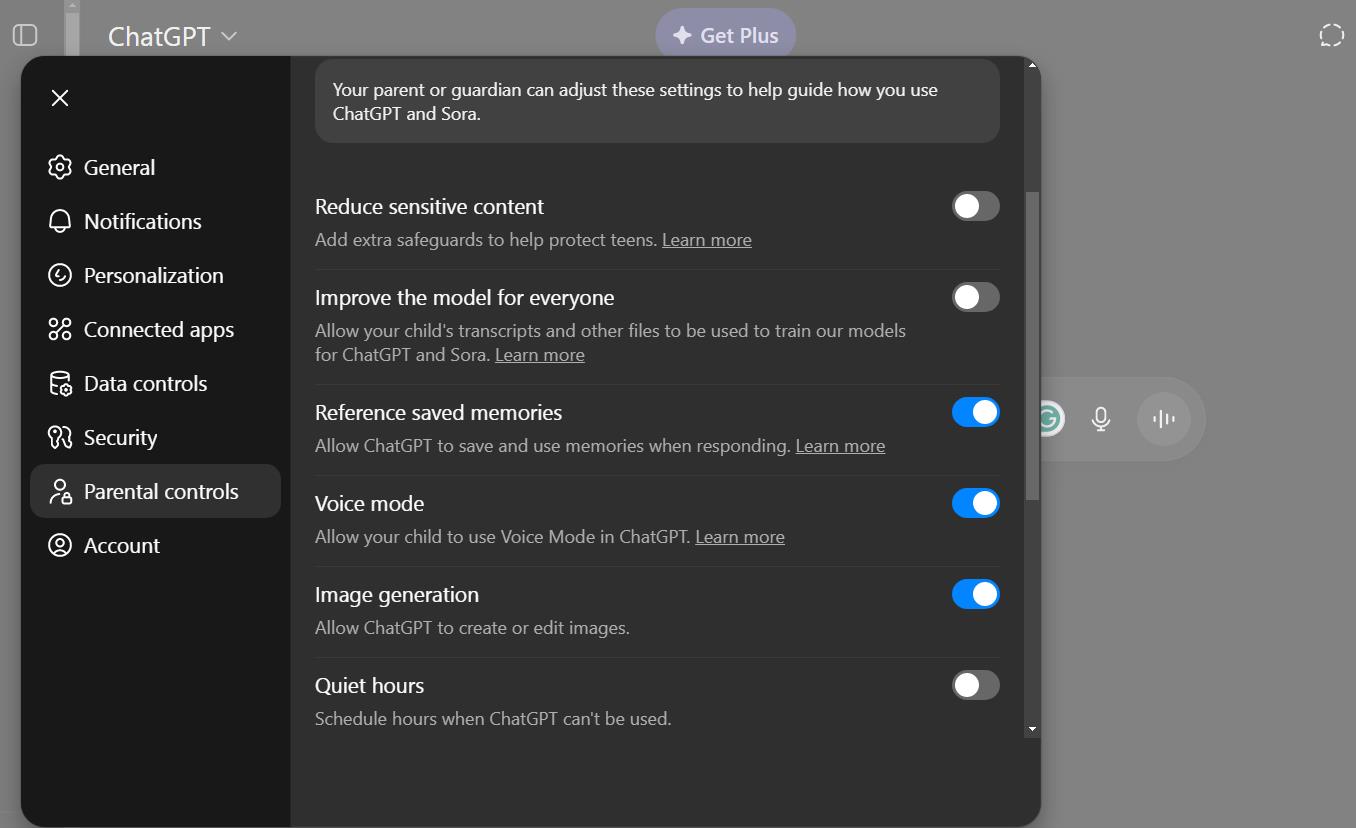
- Set quiet hours: The new parental controls can allow you to set time windows when ChatGPT is unavailable in your child’s account. This can help balance the child’s screen time and offline activities.
- Control image generation: If you’re concerned about your child using ChatGPT to generate harmful or inappropriate visuals, you can also disable AI image creation entirely for the teen so ChatGPT won’t be able to generate or edit images for them.
- Turn off voice mode: Parental controls can also allow you to disable voice mode if you feel real-time voice conversations with ChatGPT are unnecessary or distracting your teen.
- Opt out of model training: To prevent OpenAI from using your teens’ conversations to train their model, you can choose to stop this using the new parental control settings.
- Turn off ChatGPT memory: Since memory allows ChatGPT to “remember” details across sessions, you can decide to switch it off entirely to ensure every interaction starts fresh for your teen. This may help limit long-term personalization and reduce privacy risks.
OpenAI noted that these settings are optional and flexible, and families can actually choose what works best for them.
How to Set Up Parental Controls in ChatGPT
To set up parental controls, you have to send an invite to your teen to connect their accounts. The teen can also invite you to connect. Once connected, you can manage the teens’ settings from your account.
To learn how it works, here’s a step-by-step guide on setting up parental controls in ChatGPT’s web version.
Step 1: Access the Parental Controls Menu
In ChatGPT web version’s Settings, go to “parental controls” or visit https://chatgpt.com/#settings/ParentalControls directly.

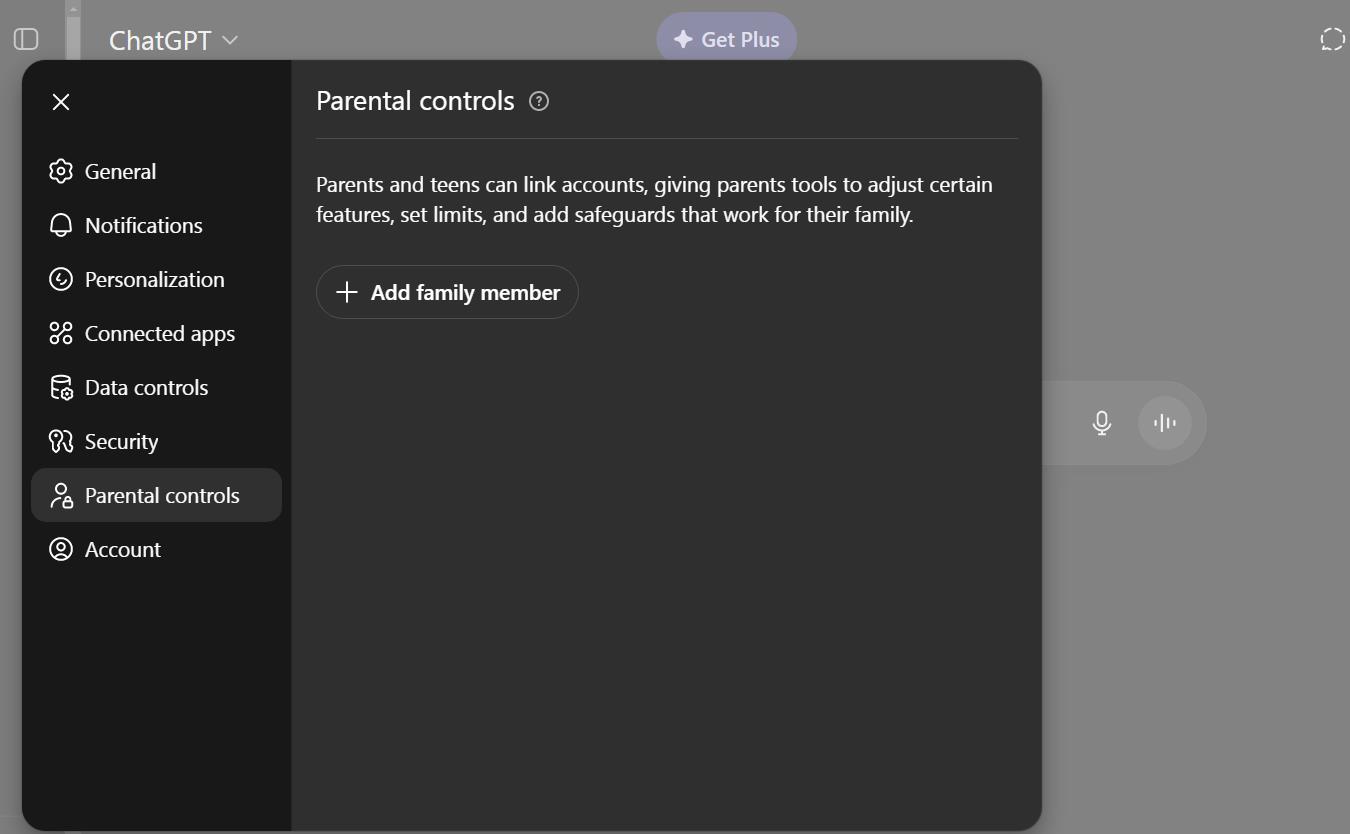
Click “Add family member,” insert your teen’s ChatGPT account email, select “My child,” and hit the “Send” button to invite your teen to connect by email.
Alternatively, you can also invite the teen via text by clicking the “Use phone” option at the top right corner.

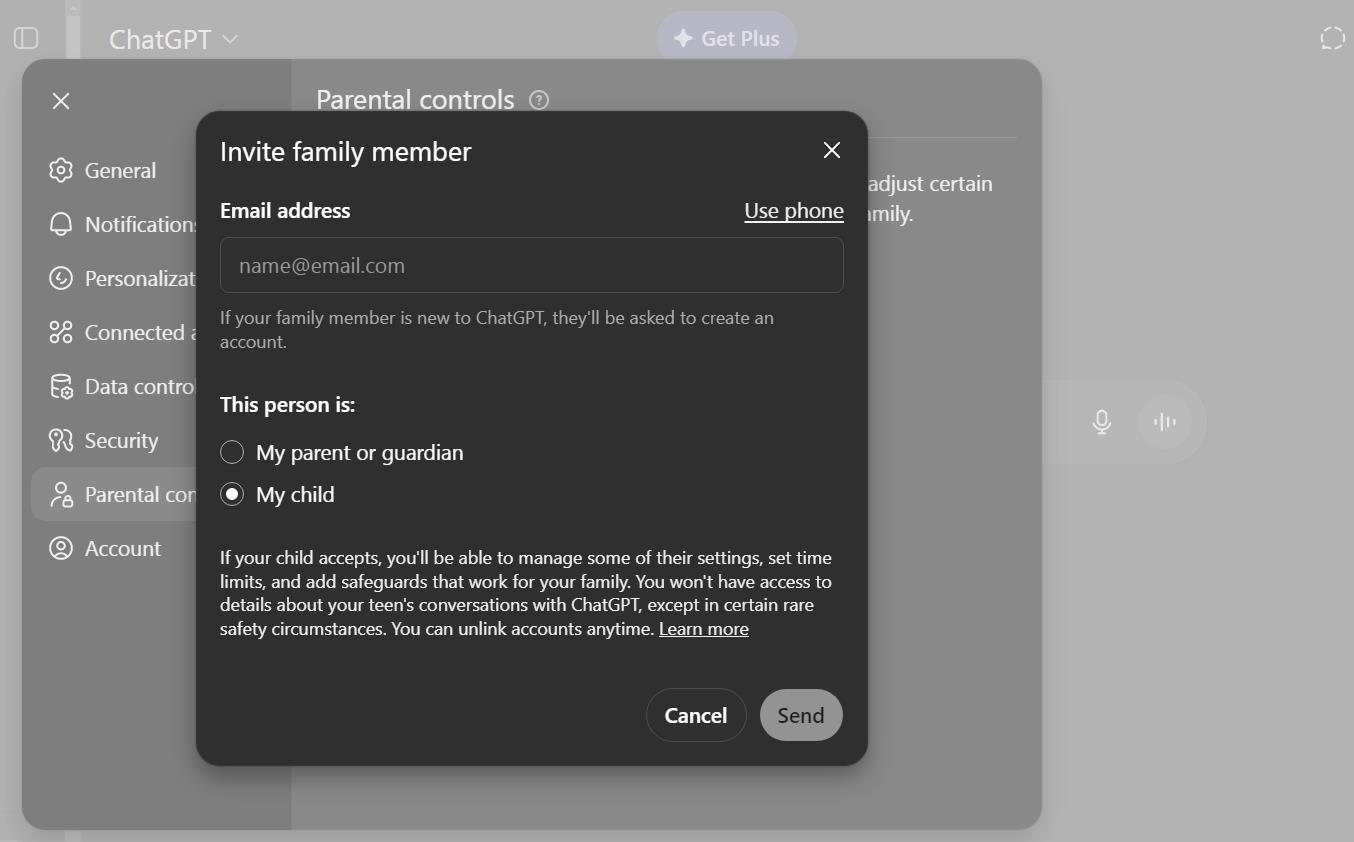
Step 3: Adjust Your Teen’s Parental Settings
Once the teen has accepted the invite, click on their account name in the parental controls dashboard. Here, you can adjust their settings by simply toggling on and off the features you consider necessary for your child’s safety.

Can These Controls Really Keep Teens Safe?
OpenAI’s ChatGPT parental controls arrive at a critical moment when concerns are growing about the effect of AI on young users. Psychiatric Times warned in a recent article about the dangers of allowing teens to have a free ride with AI chat.
Allen Frances, MD, Professor Emeritus of Psychiatry and Behavioral Sciences at Duke University, wrote:
“Unchecked validation from bots can intensify dangerous thoughts, feelings, and behaviors – especially in children who are in the midst of adolescent turmoil or severe psychiatric problems. Numerous troubling reports illustrate how overly accommodating bots can accentuate psychotic thoughts, suicidal behaviors, self-mutilation, grandiose feelings, conspiracy theories, and bullying.”
Giving parents visibility into what their children are up and about with AI is a strong way to enable parental oversight and possibly help young people stay safe with AI.
While parental controls will not be a one-stop fix for safe AI use among kids, OpenAI’s approach to these controls means that teens cannot simply opt out of parental controls on ChatGPT at any time on their own.
Even with these protections in place, OpenAI admits the system isn’t perfect and could still be bypassed by determined users. The company says it will keep improving the feature over time and encourages parents to have open conversations with their teens about healthy AI use and how it can support safety for everyone in the family.
ChatGPT parental controls are good steps towards making sure parents have adequate oversight on how their teens use ChatGPT.
Kids are increasingly becoming addicted to chatbots, with some even making them their personal AI companions and confidants. Parental controls in ChatGPT enable parents or guardians to limit their children’s addiction by setting time limits on chatbot usage or preventing over-personalization by disabling ChatGPT memory.
While the approach helps manage AI risks among young people, OpenAI calls on parents to complement its efforts by talking with their teens about using AI responsibly.
FAQs
Once a parent and teen link their accounts, only the parent can manage or disable parental controls. If a teen tries to unlink their account, the parent is immediately notified, and the teen cannot bypass the protections. However, OpenAI admitted that determined teens can potentially find some loopholes.