

The research
- Why you should trust us
- Who this is for
- How we picked and tested
- Best on-the-go system: UnaliWear Kanega Medical Alert Watch
- Best home-based system you don’t have to wear: Alexa Emergency Assist
- Best traditional home-based system: LifeFone At-Home Cellular
- Other medical alert systems worth considering
- Why we didn’t test Life Alert
- The competition
- Sources
Why you should trust us
Anna Wenner is the author of several Wirecutter guides to products that are designed to help make your home more accessible—including grab bars, shower mats, and toilet-seat risers. She’s helped her own family members choose the right medical alert systems for their needs, and she knows firsthand how many challenges are involved in navigating this product category.
Pamela Appea is a health and science journalist who’s covered a range of topics that impact older adults, including dementia and Alzheimer’s disease, access to emergency medical care, and health disparities among older people of color. She was a fellow in Columbia University’s Age Boom Academy for journalists covering aging issues. And she has firsthand experience with older relatives who lost their independence due to falls or medical emergencies at home.
For this guide:
- We spent 100 hours researching dozens of medical alert systems and testing 22 home-based and on-the-go options.
- We interviewed three occupational therapists and a physician specializing in medical technology, to gain better insight into barriers, such as limited dexterity or mobility, that might affect older people using medical alert systems.
- We spoke with representatives of medical alert system companies to better understand how these devices work and to learn about related privacy and data-security issues.
- We also talked to people who use medical alert systems, and we pored over online reviews to see how the devices perform in the real world.
- Like all Wirecutter contributors, we review and test products with complete editorial independence. We're never made aware of any business implications of our editorial recommendations. Read more about our editorial standards.
Who this is for
A medical alert system can help someone maintain their independence by ensuring that they can get help when they need it—whether they’re at home or out and about. Unlike a smartphone or smartwatch, these systems provide an extra layer of support during health and other emergencies by quickly connecting to representatives who can help you or a loved one navigate the situation.
When an older person needs help, it doesn’t always warrant a 911 call. Oftentimes, support from a neighbor or friend will suffice. And when a person is experiencing a medical emergency and dials 911, it’s not always easy for a 911 operator to interpret a hang-up call or to understand the caller’s medical history, especially if they’re unable to speak. That’s what can make a medical alert system a lifesaver.
We focused on devices for two main groups of adults:
- those who need a medical alert system for use in their home only (and those who don’t want to futz with the technology)
- people who want a wearable device for inside and outside their home (and who may be more comfortable with technology)
Older adults aren’t the only ones who can benefit from these devices. Those with certain disabilities or chronic health issues may find the added security of a medical alert system with a dedicated call center helpful, whether temporarily after an injury or surgery or for a longer period.
Medical alert systems can also provide caregivers, including adult children, invaluable peace of mind. Whether a caregiver is helping from across the country or just across town, it’s beneficial for them to know when a loved one is using their medical alert system and to hear from a live agent. Depending on the preferences that are set, some companies may call or text a designated caregiver or emergency contact to notify them if the medical alert system has been activated, if the battery is low, or if the device hasn’t been used in a while.
These systems can be costly, so while most health insurance plans don’t cover them, it’s still worth checking with your insurance provider. If you have a flexible spending account (FSA) or a health savings account (HSA), you can use income-tax-free money to help pay for certain devices.
When it comes to pricing, the fees can add up. If you’re on a tighter budget, keep in mind that some companies offer promotional or locked-in discounted rates. And if you’re a veteran who receives services from the Department of Veterans Affairs, you can obtain a medical alert system through your VA provider at no out-of-pocket cost to you.
How we picked and tested
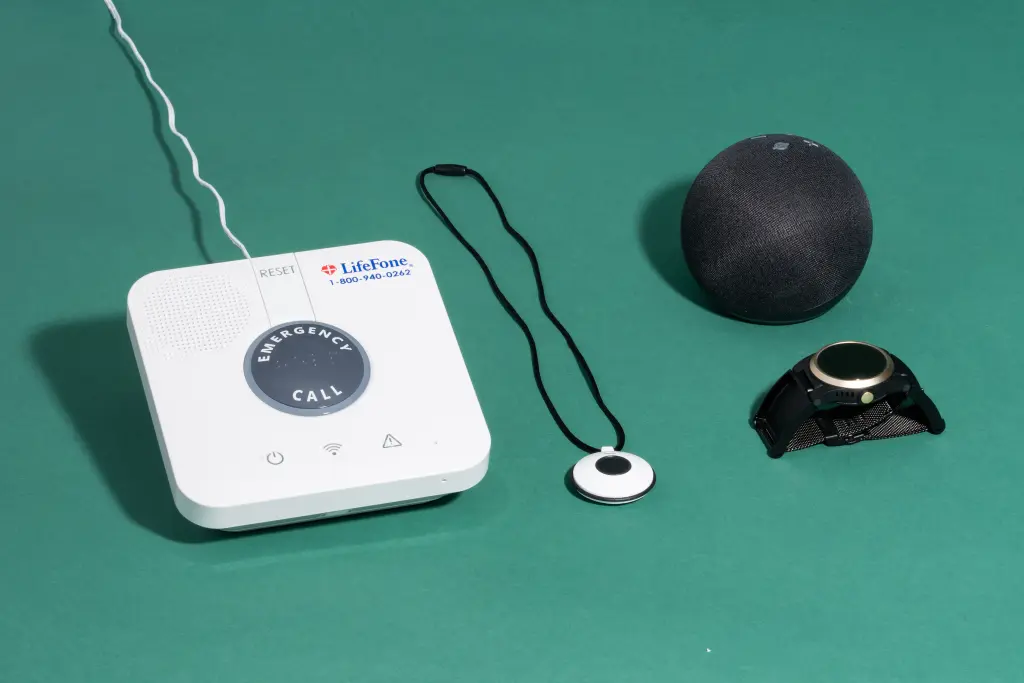
These are the essential features we looked for:
- Compassionate emergency operators: We wanted devices from companies with live agents who are helpful, kind, and patient with anyone who calls—especially those who may need technical support.
- Clear and up-front pricing: Confusing pricing structures are unfortunately a hallmark of the medical alert industry, so we prioritized companies that are up-front about their costs and those that don’t rely on confusing discounts, hidden fees, or overwhelming add-on options.
- Easy to use: We prioritized systems that are intuitive to use, easy to activate, and accessible to those with mobility limitations, especially during an emergency. They should be intuitive to set up, including unboxing the device and charging it.
- Personalizable contact options: Not every emergency requires 911, and not every person with a medical alert device wants to risk an accidental call to emergency responders. Because of this, we prioritized devices that let you customize who you want to be contacted and when.
- Accurate GPS capabilities: For on-the-go systems, we sought devices with strong GPS tracking capabilities. Though there is never a guarantee of 100% accuracy with GPS pinpointing, we focused on devices that could get us help where we needed it.
- Range and connectivity: We considered how each device sends its signal, whether that’s over cell signal, landline, Wi-Fi, or some combination, and we preferred systems that work with multiple wireless networks. With home-based systems, we looked for ones that could reach at least 600 feet from the base, though more than 1,000 feet was preferable.
- Good call quality and adjustable volume: For home-based devices, we looked for systems that would be loud enough to be heard from all over the home. We also paid close attention to the clarity and volume of sound while talking to operators.
- Aesthetically pleasing and discreet: Many people do not want devices that look like, well, medical alert devices, so we prioritized options that would be subtle additions into someone’s life. For on-the-go systems especially, we looked for ones that could pass for smartwatches or jewelry.
- Fall detection: Fall detection is not 100% accurate on any device, and it often comes with an extra fee. That said, it’s useful for many people, so we looked for models that offer a version of this feature that works reasonably well.
- Responsive customer service: We prioritized companies with live, human customer service agents who are easy to reach, interested in resolving the problem, and able to offer accessible support over the phone or online.
We tested 14 medical alert systems in 2023. In 2024, we completed another round of testing, with eight additional models (and we retested four from the first round).
We tested each of the medical alert systems for at least a week as we went about our daily lives. We tested them everywhere from an apartment building in New York City to a sunflower field in Kansas to the basement of a suburban home, and each device was tested on different days of the week and times of day to evaluate response times. We also repeatedly tested on-the-go systems for their location-tracking abilities.
For all of the devices, we went to every corner of our homes to see how strong the signal was and what obstacles it would make it through. While some systems struggled with getting a signal in places like a backyard, others could get one even from the farthest corners of a basement.
Though many of our devices were loaned for the purpose of testing, we otherwise approached each company as an anonymous customer. This meant when something went wrong, we reached out to customer service, and we even made phone calls using a Google Voice number to see how companies interacted with prospective customers.
We spoke with people who have arthritis and hearing loss to determine which accessibility features were important to them and where the systems struggled to meet their needs. We also tested each alert method with accessibility in mind, factoring in how difficult a button was to press, how loud a voice response was, and how clearly the operator could be heard.
Best on-the-go system: UnaliWear Kanega Medical Alert Watch
Top pick
UnaliWear Kanega Watch
A medical alert system for anywhere you need to go
This smartwatch-style system never has to be removed for charging, and it’s stress-free to set up and use. But it’s expensive and its GPS wasn’t always accurate during testing.
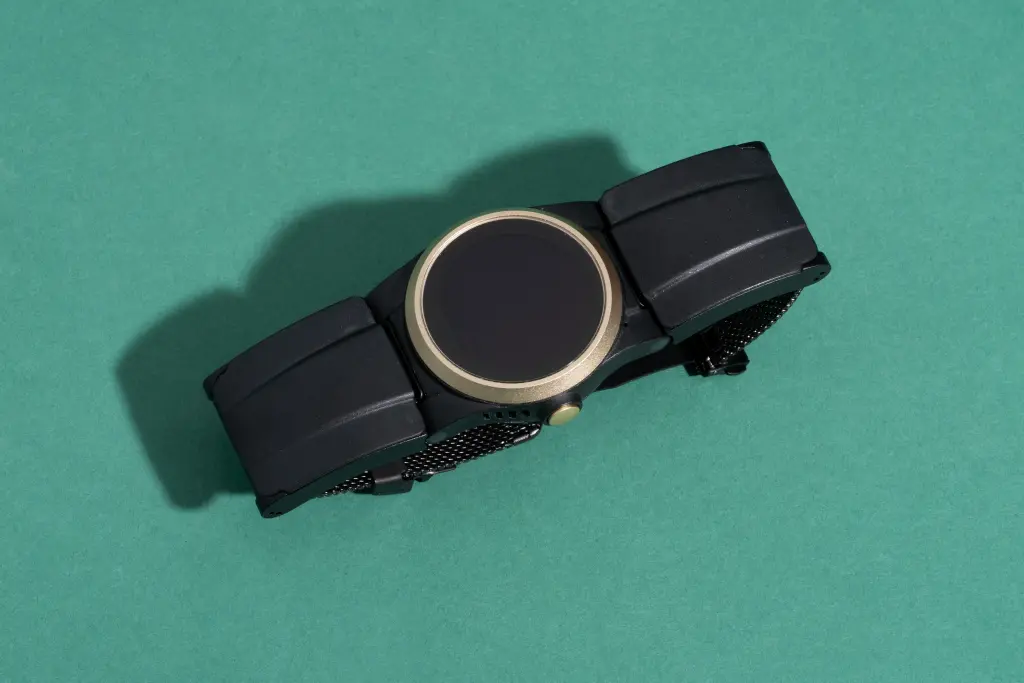
The UnaliWear Kanega Medical Alert Watch, which relies on the Verizon network, is an attractive medical alert system that looks like a smartwatch (but isn’t one). This device’s unobtrusive and stylish design makes it a good option for those who want a medical alert device that doesn’t look like one, as well as for those who want to be able to take it with them when they leave home.
We think the Kanega Watch is the best mobile medical alert device. But if you’re looking for a less expensive option, or if Verizon doesn’t have good coverage in your area, we recommend the LifeFone Safe Watch Active, which uses AT&T’s network and beat out the Kanega’s GPS accuracy in some locations during our testing.
The Kanega Watch makes it easy to contact live agents. You can either push a button or verbally tell the watch you need help by using the set wake word “Fred Astaire” and then asking the watch to “Get help.” From there, it will connect you with one of the company’s emergency operators. If you do not verbally respond after you’ve been connected, the agent will contact emergency services and a designated contact within a specified time period.
You don’t have to take it off to charge it. The watch comes with four lithium ion batteries, two of which can always be charging in the included battery charger. When the batteries in the watch lose their charge (after about 24 to 36 hours), you should swap them out for the fully charged batteries; you can do this without having to remove the watch from your wrist. Every other wearable device we tested had to be removed for charging, leaving the user vulnerable for that time and making it more likely that they wouldn’t have the device when they really need it. We also loved that Kanega Watch includes a backup battery that’s built into the watch, so even if a few hours lapse between battery switches, you still have access to help.
It’s less obtrusive than a standard medical alert device. When activated, the Kanega Watch calmly states that it’s calling the operator for help. This is a stark contrast to other devices we tested, which often make alarming beeps and loud statements like “emergency alert!”
It’s stylish and adjustable. Even with most of Anna’s friends and family aware she was testing medical alert systems, none of them identified the Kanega Watch as one. The watch face and clasp come in three colors: black, champagne gold, and rose gold. The wristband is customized to your wrist size when you order it, and you can adjust it even more precisely when you receive it. Although generally comfortable, the closing mechanism sometimes pinched and could be difficult to use, and the wristband chafed when it was wet. We also found it to be a little bulkier than a typical smartwatch, particularly on small wrists.
It connects to Verizon’s cellular network and Wi-Fi. While most on-the-go systems we tested rely solely on a cellular network, the Kanega Watch pulls from a combination of Wi-Fi and Verizon’s network (you don’t need to be a Verizon customer or buy a separate plan to use it), so its coverage is more comprehensive, especially in buildings. Although you can set up only seven Wi-Fi networks for the device to remember, that often will be enough, since you can cover the most pivotal places, like home, work, and other buildings where you’re most likely to be on your own.
Setting it up is simple. This is one of only a few medical alert systems we tested that we could have given to any of our family members and had them set up themselves. Every step is clear, concise, and laid out, and the customer service line is responsive and helpful if you have any issues.
Its live agents and customer service reps are very responsive. The emergency and customer service operators were among the best we encountered. In our first round of testing, in 2023, we found that they consistently responded within 30 to 60 seconds of our call. However, the response times were slower (more than four minutes in one case) during our more-recent testing—particularly when the watch wasn’t connected to Wi-Fi.
It comes with fall-detection capabilities. Though fall detection is never going to be 100% reliable in any device, the Kanega Watch detected most of our simulated falls. It sometimes skewed to the overly sensitive side. But you can adjust that by asking customer service to recalibrate the fall-detection settings to tailor them to your activity level—whether you’re playing tennis, moving items around your home, or staying supine while recovering from a surgery. The watch is also supposed to learn from past false alarms (it was hard to tell how effective that was from our testing). And unlike almost all the other medical alert systems we tested, it doesn’t impose an extra fee for fall detection.
The Kanega Watch’s face and clasp come in three colors, and the wristband is customized to your wrist size. Connie Park/NYT Wirecutter
False alarms are easy to dismiss. Due to the Kanega Watch’s sensitivity, it had more false alarms than any other devices we tested. However, this was less of a hassle than it was with other systems because of how painless it was to dismiss the alert before it went to the call center. Out of 17 accidental alerts (either from fall detection or voice detection), only one actually made it to the call center before we were able to cancel it, and this was partially because of how quickly they answered. If you’re getting a lot of false alarms, you can ask customer service to adjust the sensitivity.
It can remind you to take your medications. The Kanega Watch is one of the few systems we tested (along with Amazon Alexa devices, Apple watches, and the OneCare CareWatch) that has an included feature to remind you to take your medications. (Some other systems offer this for an extra fee.)
It has useful features for people with vision or hearing loss. The Kanega Watch has a large, easy-to-read screen, which is particularly useful for people who have trouble reading smaller type sizes. In Pamela’s tests in New York, its call quality was crystal-clear. During Anna’s tests in Kansas, service was spottier. And it was sometimes hard to hear through the watch’s speaker, but the agents always quickly called her cell phone if they couldn’t hear her. If you have hearing loss, you can contact the company’s customer service team to create a personalized sound level tailored to your hearing ability.
It’s water-resistant. Like almost all of the medical alert systems we tested, the device is resistant to running water, so you can wear it in the shower or while you’re exercising, but you should never submerge it in water.
It’s covered under a (limited) warranty. UnaliWear covers defects in the watch, as long as you have an active service plan. If you don’t like the watch, you can return it within 30 days of the shipment date for a full refund, but you’ll have to pay a $75 restocking fee.
Flaws but not dealbreakers
It’s expensive. The Kanega Watch’s one-time setup fee of $299 is one of the highest among those of medical alert systems we tested, as is the monthly service fee of almost $80 (or $65 if you pay annually).
GPS tracking wasn’t reliable everywhere we tested. During our most recent testing, we were disappointed with the accuracy of the device’s GPS, particularly because it was one of the most accurate when we tested it in 2023. While there are a lot of factors that affect GPS, four times out of 10, the watch couldn’t locate Anna, testing from the Kansas City metro area, in any way. And one of those times, operators incorrectly told Anna’s emergency contact that she was at home. When it was connected to Wi-Fi, though, the watch always showed the correct location.
Voice activation can be tricky to use. While we loved that voice activation was an option, it wasn’t as intuitive as we would have liked. We didn’t like that you couldn’t change the wake word, “Fred Astaire,” which in theory was memorable but ultimately easy to mix up with other famous contemporaries. After saying the wake word, you then need to say “Get help”—but this doesn’t work with slight variations or even just by saying “Help.” Even when we did remember the wake word, the watch didn’t always recognize it, but when we asked the call center to increase the sensitivity, we got frequent false alarms during regular conversations.
The batteries aren’t as easy to remove as the company claims. Despite how much we love the Kanega Watch’s always-charged system, the batteries can be difficult to swap out. Anna, a woman in her 30s with full use of her hands, at times had trouble dislodging the batteries from the watch and often dropped them in the process. At one point, a battery broke and became stuck, but customer service provided helpful advice on removing it, and it sent a new battery within days.
Key specs
- Price per month: $65 (billed annually) to $80 (billed monthly)
- Setup cost: $299
- Fall detection: yes
- Connects through: Wi-Fi and Verizon cellular network
- Water-resistant: yes
- Average response time: 1 minute 7 seconds (range was 20 seconds to 4 minutes 32 seconds)
Best home-based system you don’t have to wear: Alexa Emergency Assist
Top pick
Alexa Emergency Assist
A home-based medical alert system you don’t have to wear
This voice-activated system is unobtrusive and effective, with a quick response time and low long-term cost. But if you need features like fall detection, or you can’t use voice activation, this isn’t the one for you.
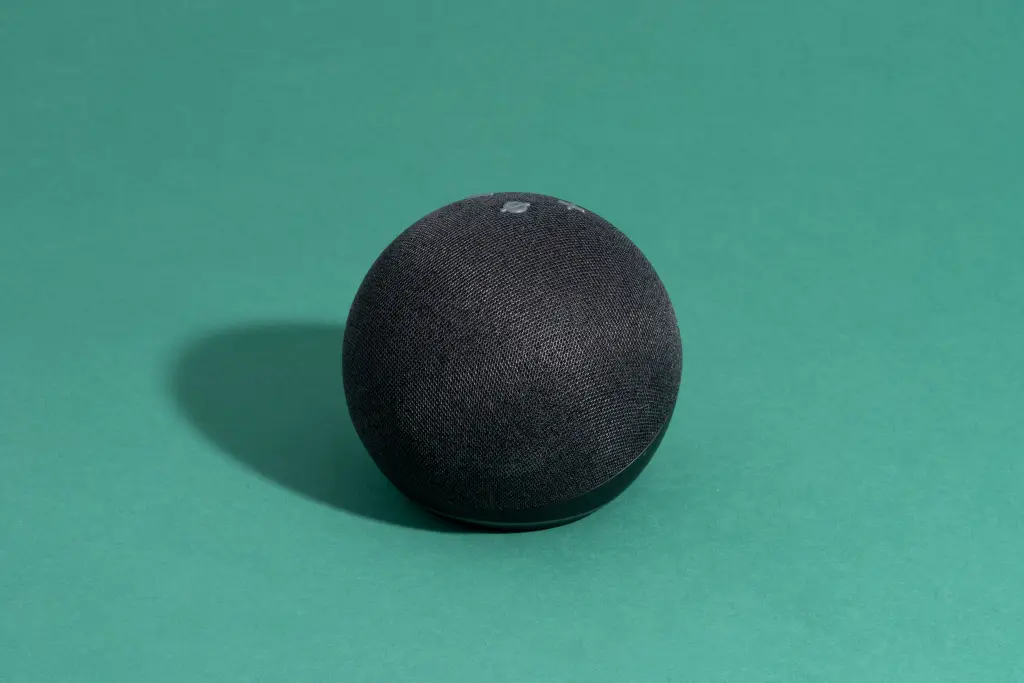
Alexa Emergency Assist differs from the other medical alert systems we tested because it does not have a designated device or app. Instead, it’s an optional subscription within the Amazon Alexa app that works through any Amazon Echo device.
Alexa Emergency Assist easily had the fastest response time of the systems we tested, and it was the most straightforward and least stressful to use. Altogether, purchasing it and setting it up took less than five minutes—the quickest of any system we tested. But if you’re not tech-savvy, or if you’ll have trouble remembering to say the wake word (set to “Alexa” as default) before you make a request, this system may feel less intuitive. And not everyone will be comfortable having a device in their home that’s always “listening.”
It has the shortest response time. On average, Alexa Emergency Assist took 14.6 seconds to connect Anna with a live operator, the speediest time of any system we tested by far. Its quickest response was a mere seven seconds—13 seconds less than the next fastest system we tested.
It’s a discerning listener. The Alexa system ignored the wake phrases if we said them in a calm way during a conversation (for example, explaining to someone how it worked), but it immediately responded anytime we were trying to alert it during testing. It was able to pick up on the need for assistance with a variety of phrases, including “Alexa, help,” “Alexa, I’ve fallen,” “Alexa, call for help,” and “Alexa, get help.” A major problem with the other voice-activated alerts is that they respond to only a very specific phrase, such as, “Call for help” (but not "Get help”). You can also change the wake word from “Alexa” to something easier to remember (for those out there still trying to ask “Amanda” or “Alice” to turn on the music), such as “Amazon,” “Echo,” “Computer,” or “Ziggy.”
You can add as many speakers as you need. Unlike other home-based systems, which rely on a single base unit for an entire home, you can add an Alexa device to every room you frequent (which we recommend). This capability distinguishes the system from most other home-based systems we tested, which don’t have the range to fully cover a larger house and often don’t let you add additional bases to extend the range. That said, we were impressed by how far we could be from the Alexa device and how quietly we could speak while still getting a response.
In addition to using your Echo speaker to call for help, you can also speak to a live agent through the app. Amazon
It’s incredibly cheap, if you already have Alexa speakers. While the price of outfitting your home with Amazon’s smart-home speakers isn’t exactly inexpensive, the actual emergency service is refreshingly affordable. At just $5 to $8 a month (depending on if you pay monthly or annually and if you’re a Prime member), this system is easily the least expensive one we tested. For those with smaller homes, such as a one-bedroom apartment or condo, the one-time cost of about $120 you’d need to pay for three or so devices is still less expensive than for any other system we tested.
Family members and friends can “drop in” if they have an Echo device. If your caregiver or your friends or family also have an Echo speaker, they can call your Echo or vice versa, or they can “drop in” to check on you. You can also set up multiple Echo devices, to use as an intercom system to communicate with others within the same home.
It can alert you to alarms in your home. Alexa Emergency Assist sends you a notification on your phone if a fire alarm is going off in your home, and it even allows you to listen to the alarm live (to decide whether it’s real or just coming from a TV show) and have a recording for later. (It also advertises that it can notify you about the sound of breaking glass, but we didn’t get any response after breaking glass directly next to the Alexa speaker multiple times.)
It has a “whisper” mode. If you enable whisper mode, Alexa will automatically match its volume to yours, so if you need to call for help quietly, you aren’t announcing it across the house. (You can leave whisper mode turned off if you’re more concerned about being able to hear the response than getting help quietly.)
It works seamlessly with Apple and Android phones. The Alexa app works equally well on iPhones and Android phones—distinguishing it from other systems we tested with apps that were compatible with only one phone operating system or had different apps for Apple and Android phones.
Flaws but not dealbreakers
It relies almost entirely on voice activation. If using voice activation is a challenge, the only alternative is to send an alert from your phone. This won’t work as well for people who prefer a single-use button or who have trouble speaking clearly.
There’s a learning curve. If this is your first time using smart-home devices, it might take some getting used to. If you have multiple Alexa speakers for different rooms, it can be a pain to get the devices to work together as a system. While Alexa Emergency Assist itself is easy to install and set up, there isn’t an easy way to talk to a customer service agent if you’re having issues, and there’s no real training on how to use the system, unlike with others we tested.
Its listening capabilities may make some uncomfortable. We know some people don’t like the idea of being listened to by artificial intelligence in general, and we discuss the pros and cons at length here. Note that for Alexa to function, it requires a constant connection to the internet and the ability to listen for a wake word, which triggers it to act. While you can mute the microphone, that would prevent the use of Alexa Emergency Assistance.
The cost of multiple speakers can add up for bigger spaces. If Anna followed Amazon’s guidelines to the letter for her own home, she’d need five devices just for the main floor. However, during testing she had only three to four active at once on the main floor, and this never posed a problem. So a lot will depend on the layout of your home and how you use the spaces.
There’s no battery backup, so the system won’t function during a power outage. Unlike traditional home-based medical alert systems, Amazon Echo speakers and other devices don’t have backup batteries. If the power goes out, your device turns off, which is obviously less than ideal in an emergency.
Key specs
- Price per month: $6 (Prime members billed monthly) or $8 (non-Prime members billed monthly) to $5 (Prime members billed annually) to $7 (non-Prime members billed annually)
- Setup cost: $40-plus per Amazon smart speaker, with one device recommended per room
- Fall detection: no
- Connects through: Wi-Fi
- Range: Amazon recommends having one device per room
- Water-resistant: no (yet it can hear and respond over noises like showers and dishwashing)
- Average response time: 14.5 seconds (range was 7 seconds to 20 seconds)
Best traditional home-based system: LifeFone At-Home Cellular
Top pick
LifeFone At-Home Cellular
A traditional, home-based medical alert system
This system is louder and more conspicuous than our other picks, but it’s straightforward, and it offers multiple ways to call for help.
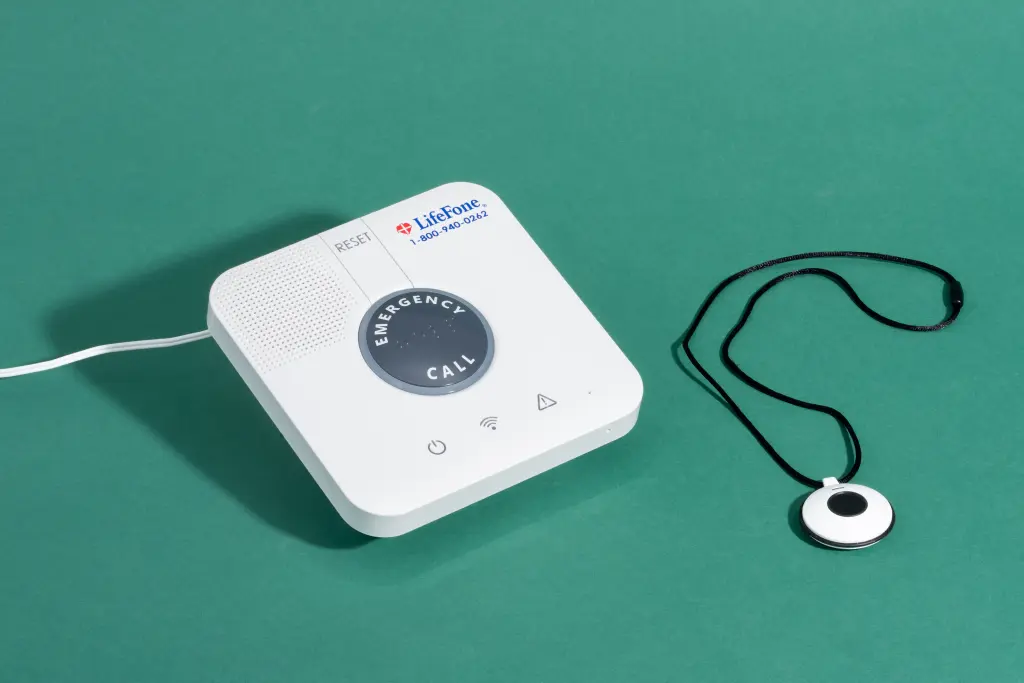
The LifeFone At-Home Cellular includes a base unit with a speaker and one of two wearable options, a neck pendant or a wristband (you can call for help anywhere in your home using the wearable buttons, but you can only speak with a live agent through the base). The compact design and quick operator response times make this the best option for those who need emergency assistance only at home and those who want a simple system that doesn’t involve fiddling with technology. LifeFone also offers a similar system for those who rely on a landline: the LifeFone At-Home Landline.
Unlike that of the Kanega Watch and Alexa Emergency Assist, LifeFone’s technology isn’t unique. In fact, we suspected that it was the exact same base unit sold by other companies. A large part of its appeal is that it looks and functions like a traditional medical alert system is expected to: To call for help, you simply push a physical button. This makes it more intuitive to understand and use for those who are especially technology-averse. If you need to cancel your service, there are no cancellation fees, but you do have to return the equipment first.
It’s straightforward to use. For those who are easily confused or frustrated by technology, LifeFone is a no-fuss alternative to more-confusing setups. The only thing the wearer needs to remember about their LifeFone system is that the buttons on their wearable and on the base will get them help when they need it. There are also additional buttons available for purchase that can be positioned around the house, if the wearable button isn’t your preference, or if you just want to supplement it.
It’s accessible to those with limited dexterity. If you opt for LifeFone’s pendant button, putting it on is effortless, since it goes over the head and has a magnetic closure that’s easy to undo and redo, even for those with limited dexterity or strength. It also doesn’t require two hands to put on or take off, unlike a wristband-style device like the Kanega Watch.
Unlike the wearable buttons, the base has a two-way speaker to communicate with live agents. Connie Park/NYT Wirecutter
You can choose how you want to wear it. Though LifeFone comes with only one button included in its base price, you can choose whether you want it to come as a pendant, wristband, or a pendant with fall detection (for an additional $5 per month). You can also use the button on the base to call for help if you’re closer to it than to one of the wearable buttons.
The buttons are water-resistant. The wearable buttons are all resistant to running water, so they can be worn in the shower, during exercise, or while washing your hands. However, they shouldn’t be submerged in water for any length of time.
It connects to AT&T’s cellular network. If Verizon doesn’t have good coverage in your area, LifeFone may work better for you than the Kanega Watch because LifeFone uses AT&T’s cell towers. For those who have little cell coverage in their home at all, LifeFone also offers a very similar landline option, the LifeFone At-Home Landline (which we did not test). However, unlike the Kanega Watch and Alexa Emergency Assist, LifeFone does not utilize Wi-Fi, so it might not have as strong of a signal in large buildings.
It can monitor room temperature. The system can send an alert if the temperature of the room the base is located in goes above or below your customized range.
There are no setup or cancellation fees. Unlike most other medical alert systems we tested, including the Kanega Watch, there’s no fee when you purchase or activate the system. If you decide that LifeFone isn’t working for you, you can return it for a full refund, if it’s within 30 days of your service starting (you will have to pay for the return shipping). After that, you can still cancel your service at any time with no penalties and get a refund for any full months that were prepaid (such as if you paid for a full year), but the cancellation is only effective once you return the equipment.
Flaws but not dealbreakers
The only way to speak to a live agent is through the base. The range on the LifeFone’s base speaker is fairly impressive (up to 1,300 feet) compared with the ranges of similar devices we tested, but it isn’t ideal that there’s only a two-way speaker on the base device and not on the wearable buttons themselves. And unlike with the Alexa Emergency Assist system, with the LifeFone, you can’t add multiple bases. So if you set off the device by mistake while you’re in an area of the home or yard where you can’t hear the alarm go off, you’re more likely to have a false alarm reach your emergency contacts or 911.
There’s no way to cancel a false alarm. One of the most frustrating things about this system—and most classic home-based systems—is that you cannot cancel an alert once it’s been made. While this may seem like a small price to pay for a good medical alert system, it can get annoying fast. Particularly when we had fall detection enabled, Anna would often set off the alarm whenever she took off the pendant and set it on a table. When she was particularly careful, this didn’t happen. But for anyone with a tendency to drop things on a table in a hurry between activities, you can probably expect the fall detection to go off a lot.
The alarm can be anxiety-inducing. Compared with some of the other home-based systems we tested, the LifeFone was practically relaxing, but it nonetheless has the same anxiety-inducing loud noises of any alert in this category. Because it must be loud in order to be heard around the house, the sound of the initial alarm can be majorly startling (especially if you didn’t realize you set it off).
If you want more than one wearable button, it’s going to cost more. While it’s nice that you can get extra pendants—and that they don’t have a monthly additional cost, as with so many of LifeFone’s competitors—$40 is still a hefty price to pay just to have a second button.
There’s no pretending it’s anything but a medical alert device. Though LifeFone is subtler than some of the other home-based medical alert systems we tested, due to its neutral colors, it’s still obviously a medical alert device, and it must be placed prominently in your home to get the best signal.
Key specs
- Price per month: $31 (billed annually) to $35 (billed monthly)
- Setup cost: none
- Fall detection: yes (with an additional $5 monthly fee)
- Connects through: AT&T cellular network
- Range: 1,300 feet from base
- Water-resistant: yes
- Average response time: 55 seconds (range was 20 seconds to 2 minutes 5 seconds)
Other medical alert systems worth considering
If you’re looking for a less-expensive smartwatch-like medical device: Consider LifeFone Safe Watch Active or LifeStation Sidekick Smart. LifeFone and LifeStation appear to use the same smartwatch technology for their on-the-go systems. During testing, we found the watches themselves to be more or less identical. Ultimately, however, we liked the LifeFone Safe Watch better than the LifeStation Sidekick Smart because of its lower price, lack of activation fee, lower fall-detection fee, and slightly more accurate GPS location tracking. That said, both watches were safe and reliable.
If you want an alternative home-based medical alert system: The ADT Medical Alert Plus has an easy plug-in setup, with no landline or installation required. The pendants have a 600-foot range from the base unit, and the backup battery lasts up to 30 hours after a power outage. Like our LifeFone pick, it’s best for those who want a home system they can attach to the wall in a central location, while wearing a corresponding pendant or wristband that’s paired with the base unit. The device can also monitor the room’s temperature, and for an extra fee, you can add fall detection. However, we found that the device connected more slowly to a live operator than others we tested, with the longest wait time being two minutes.
If you’re looking for a medical alert system you can use outside, but you don’t want a smartwatch: Try ADT’s On-The-Go, Bay Alarm Medical’s SOS All-In-One 2, or LifeFone’s VIPx. While none of them are exactly hiding that they’re medical alert devices, all offer a relatively subtle, convenient way to have help on hand.
ADT’s mobile option, ADT On-The-Go, is a small, mobile device that you can use at home or outside. Like the home-based systems, the mobile base unit pairs with either a neck pendant or a wristband, and you can add fall detection for an additional monthly fee. We didn’t like it as much as the Kanega Watch because it’s less subtle and has to be taken off every day to charge, but it’s still a worthwhile and much less-expensive alternative to our top pick.
The Bay Alarm Medical SOS All-In-One 2 is a small, no-frills, GPS-enabled mobile device that offers access to emergency help with a long-lasting battery life of 72 hours. The system comes with an app for caregivers, which allows them to monitor the wearer’s location and whether the device’s battery is running low. (We recommend always getting the consent of the person wearing the device before setting up any kind of location tracking or monitoring, if possible.) Although Bay Alarm Medical’s GPS capabilities usually came close to our current location, they weren’t entirely accurate when we were out and about. We like that the company offers attractive pendant covers to conceal the device, but the additional $25 charge is hefty.
LifeFone’s VIPx pendant had strong location tracking, easily identifying exactly where we were in every test but one (where it came within a house of us). The response time was nearly always under 30 seconds, and the call center was patient and friendly. However, the speaker on this pendant is a little on the quiet side, which was nice for drawing less attention in public, but it was sometimes hard to hear amid even moderate ambient noise. So the VIPx is a good alternative but not one of our picks.
Why we didn’t test Life Alert
We decided not to test models manufactured by Life Alert, of “Help! I've fallen and I can't get up!" fame. Founded in the 1980s, this company is synonymous with medical alert systems. However, we found this company to be confusing and predatory with how it interacts with potential customers.
The pricing is not readily available on the Life Alert website, and it took calling two different numbers and a 15-minute sales pitch to finally be told the price. The sales representative leaned into aggressive sales techniques and was actively combative when pressed for any basic details, such as the monthly cost, activation fees, and the length and terms of the contract.
Unlike the other devices we tested, Life Alert requires customers to sign a 36-month contract that can be broken only if the customer goes into full-time care or dies. It also has one of the most expensive activation fees of any we tested ($247 at the time of writing) and the most expensive monthly cost ($90 per month).
The competition
We were excited about the Martha Stewart–backed Silvertree Reach after testing it—and we actually found it to be one of our favorite on-the-go systems. However, the company has since closed down.
We no longer recommend Medical Guardian’s MGHome Cellular, a former pick.
Medical Guardian’s MGHome Cellular was previously our top pick in part because of its quick and friendly responses. However, when we tested again, in late 2024, we found that the default setting is for all calls for assistance to be answered by an automated voice. It didn’t understand any responses we gave besides a clear “yes” or “no,” and although it did eventually send us to a real human, the impersonal nature and frustrating process were impossible to get past. While you can disable this setting, it isn’t communicated clearly to customers that this is an option. In addition, we found that the voice-activated wall button did not work consistently, that cancelling service involved a previously undisclosed restocking fee, and that getting in touch with any sort of customer service person was nearly impossible.
After cancelling our Medical Guardian subscription and returning the product, we began getting emails intended for the system’s new owners. These emails included the names of both the new user and their emergency contact. When we approached Medical Guardian’s customer service about the mistake, we were told the new users would not be notified that their information had been exposed because we didn’t have “their private information. Just names.” In an email, senior director of brand and member experience Mischa Kregstein said this was an isolated incident and that she “can confirm that no member personal health information was shared, and all standard security protocols functioned as designed.” However, given the highly personal nature of a medical alert device, this still felt like a gross breach of privacy.
For similar reasons, we are no longer recommending the Medical Guardian MGMove and Medical Guardian MGMini as models worth considering. Though we did not retest these two devices, we did confirm with the call center that it uses the same automated voice system to answer all calls, unless you disable it. This isn’t indicated anywhere on the website, nor was it communicated to us in our initial informational call.
With the Lively Mobile+ (now replaced by the Lively Mobile2, which we didn’t test), conversing with customer service by phone or email was surprisingly difficult, before and after we purchased the device. The device did not register anything during our fall-detection tests. And an on-call nurse service was supposed to be available for an additional fee, but since we could never reach customer service to set that up, we were unable to test the service.
We retested LifeStation Sidekick Home, which we dismissed during our first round of testing, but our opinion hasn’t changed. While the emergency operators for LifeStation continue to be great, the device simply wasn’t as reliable or flexible as others we tested.
Unlike the other systems we tested, the Apple Watch Series 8 and Apple Watch SE don’t have a designated team of operators, so any emergency alerts go straight to 911. While in theory it’s nice that the watches automatically enable fall detection for those over 55, it can lead to a lot of false alarms, particularly during activities like amusement-park rides and engaging in sports.
The aesthetic Trelawear Sally Pendant had reliable location tracking and response times consistently under a minute, but it also had a few key issues that made us dismiss it: It requires you to be very close (within 100 feet) to your cell phone at all times; it isn’t waterproof; and it offers no way to cancel (or even notify you that you sent) an alarm. Its app was confusing, and it was different for Android and Apple phones.
One of the most appealing medical alert systems, from a caregiver perspective, is OneCare’s CareWatch. It offers a lot of what you’d expect from a medical alert smartwatch, such as fall detection. And it has a comfortable band, which proved to be one of the most accessible band designs of any watches we tested. Where it really stands out is its inclusion of an optional geofence and its frequently updated, highly accurate map. The geofence is a dignified alternative to door alarms for those caring for someone with memory challenges or dementia. And this device’s ability to see whether the watch is charged and being worn allows even remote caregivers to have some extra peace of mind. OneCare offers a lot of promising features, but there are still a few too many wrinkles that need to be ironed out before we can recommend it. We’re looking forward to giving it another try in our next round of tests.
The biggest advantage of Bay Alarm Medical Company’s GetSafe is that it doesn’t rely on a wearable component—the only system besides Alexa Emergency Assist to offer this option. GetSafe uses a series of wall buttons, pull cords, and voice activation in order to send an emergency alert. Strictly speaking, these methods all worked, and the system was reliable and responsive. But we found it confusing to set up and to use.
The MedEquip Alert is a compact, peanut-shaped device that works almost immediately after you plug it in to charge. It could be a good option for qualifying US military veterans, to whom the company provides this system for no out-of-pocket cost. The device was unnecessarily hard to purchase, but once we had it, the emergency agents were always pleasant and professional. Though the device offers fall detection, it did not detect any of our falls during testing, and we found pressing the alert button a little difficult.
We chose not to test MobileHelp and One Call Alert because neither listed pricing information on their websites, and both required thorough contact information before they would provide information.
We liked a lot of aspects of Aloe Care Health’s Essentials Hub. Yet ultimately we decided not to test it because of the limited range of its voice-activated base (and an inability to extend the range with more bases) as well as the higher price tag. We also considered, but ultimately decided not to test, the Mobile Companion 2 in this round because of its bulkier design and the need to take it off daily for charging.
We decided not to test Alert1 and Lifeline after calling them as potential customers. Both engaged in aggressive sales tactics, such as adding pressure with “limited time deals” and attempting to upsell unnecessary additions for the situation described. After making an anonymous customer call to Alert1, Anna received five phone calls, two voicemails, and four emails between the end of July and September. Lifeline proved to be one of the most predatory companies after Life Alert; the sales representative was rude and resorted to scare tactics and guilt to try to make a sale.
This article was edited by Claire Perlman, Kalee Thompson, and Christine Cyr Clisset.
Sources
Richard Milani, MD, chief clinical transformation officer at Ochsner Health System, phone interview, June 16, 2023
Jasun Fiorentino, developer of the MedEquip Alert, phone interviews, March 23, 2023, and June 14, 2023
Regula H. Robnett, PhD, OTR/L, gerontologist and professor emeritus at University of New England, phone interview, June 15, 2023
Lynda S. Lemisch, OTD, OTR/L, CLCP, CAPS, assistant professor of occupational therapy at Saint Joseph’s University, email interview, June 15, 2023
Richard Hirsch, MBA, chief marketing officer at UnaliWear, phone interviews, March 23 and 24, 2023, and email interview, March 23, 2023
Mitchell J. Katz, Senior Public Affairs Specialist with the Federal Trade Commission in the Office of Public Affairs, August 1, 2024
Scott Trudeau, director of practice engagement for the American Occupational Therapy Association, video interview, July 26, 2024
Matthew Guerrieri, chief marketing officer at Medical Guardian, phone interview, April 3, 2023, and email interview, July 5, 2023
Howard Teicher, vice president of Healthcare & Business Development at Medical Guardian, phone interview, April 3, 2023, and email interview, July 5, 2023
Meet your guides
Anna Wenner
Anna Wenner is a freelance writer. Though Anna’s writing spans everything from fandoms to fashion, she especially loves accessibility and LGBTQ+ topics. Previously Anna created cards at Hallmark, documented graves at a cemetery, and photographed everything from the NCAA tournament to President Barack Obama.
Pamela Appea
Pamela Appea is an independent health and science journalist who has covered a wide range of health and science topics, including caregiving, aging and chronic health conditions, parenting, and disease/health disparities through an intersectional lens, for Glamour, Parents, Salon, and Prism, among other publications.